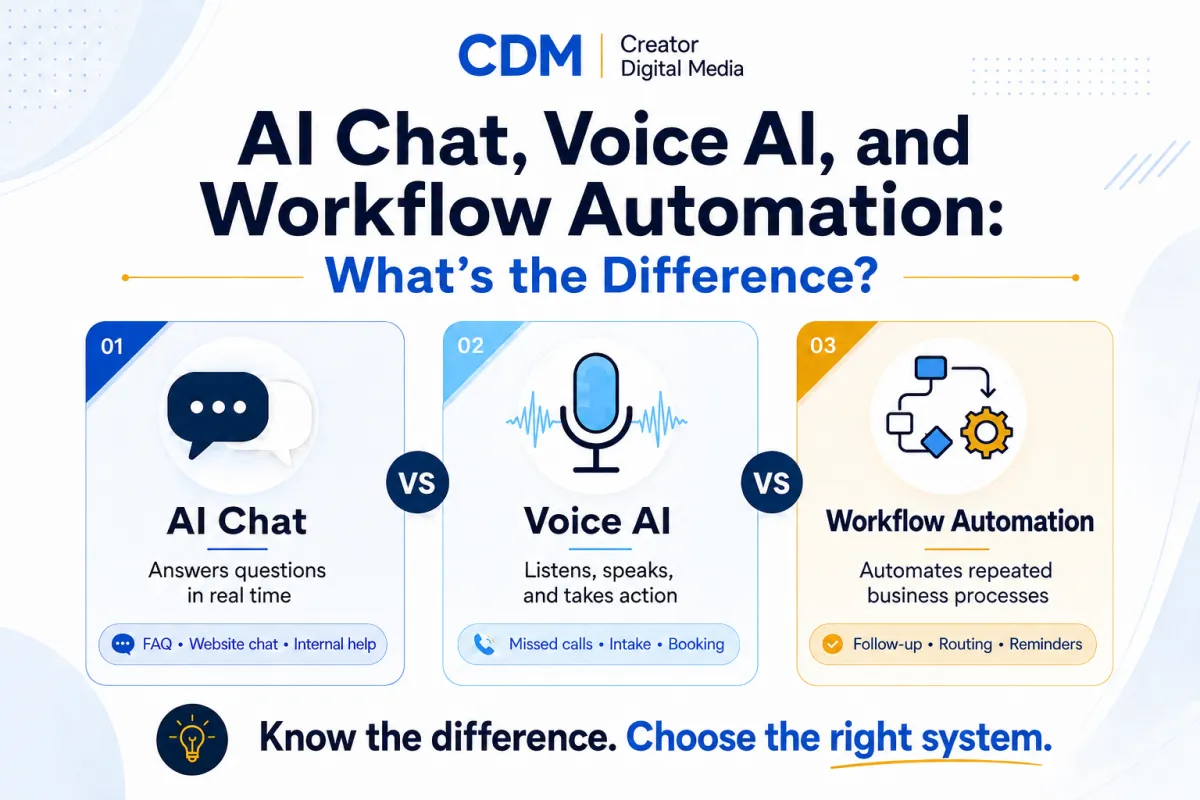
AI Chat, Voice AI, and Workflow Automation: What's the Difference?
AI tools can sound similar when they are discussed in broad terms. A business owner may hear about AI chatbots, Voice AI, AI agents, workflow automation, and CRM automation in the same conversation and assume they all do the same thing.
They do not.
For a small business, understanding the difference matters because each system solves a different operating problem. Choosing the wrong one can create more tools, more confusion, and more manual cleanup. Choosing the right one can improve response speed, consistency, customer experience, and internal visibility.
A useful way to think about this is simple: AI chat helps with written conversations, Voice AI helps with spoken conversations, and workflow automation helps move work through the business.
These categories can work together, but they should not be treated as interchangeable.
What AI chat does
AI chat usually refers to a text-based assistant that can answer questions, guide a visitor, collect information, or support a written conversation. It may live on a website, inside a customer portal, inside an internal knowledge base, or inside a business system.
For small businesses, AI chat is often useful when customers or prospects repeatedly ask similar questions. Examples include service details, pricing ranges, process questions, appointment steps, onboarding instructions, support topics, and general business information.
A good AI chat setup can help a visitor get an answer without waiting for a manual reply. It can also collect useful context before a human steps in.
Good AI chat use cases include:
·Website FAQ support
·Service explanation
·Lead qualification questions
·Internal knowledge retrieval
·Customer support triage
·Intake guidance
·Basic appointment or next-step direction
The key point is that AI chat is strongest when the business has clear written information for the system to use. If the source material is weak, outdated, or unclear, the chat experience will be weak too.
What Voice AI does
Voice AI handles spoken interaction. Instead of typing into a chat window, the customer speaks with an AI-powered voice assistant over the phone or through a voice interface.
This can be useful for businesses that miss calls, rely on appointments, handle repeated phone questions, or need faster first-contact response. Voice AI can answer basic questions, collect intake details, route callers, help with scheduling, and summarize what happened after the call.
Good Voice AI use cases include:
· Missed-call coverage
· Appointment booking support
· After-hours lead capture
· Customer FAQ triage
· Intake collection
· Call routing
· Reminder calls
· Follow-up calls
Voice AI should be designed carefully. A phone conversation can affect trust quickly. If the voice assistant sounds unclear, gives wrong answers, or does not know when to hand off to a person, it can hurt the customer experience.
That is why the best first Voice AI workflow is usually narrow. It should have a clear job, clear boundaries, and a human handoff path.
What workflow automation does
Workflow automation is different from AI chat and Voice AI. It is not mainly about conversation. It is about making a defined process happen consistently.
Workflow automation can move information between tools, create tasks, send follow-ups, update CRM records, notify team members, trigger reminders, and keep a process from depending entirely on memory.
Good workflow automation use cases include:
·Lead routing
·CRM updates
·Task creation
·Appointment reminders
·Proposal follow-up
·Customer onboarding steps
·Internal notifications
·Pipeline movement
·Reporting summaries
Workflow automation is often the operating layer behind AI chat and Voice AI. For example, a chat assistant might collect a lead's information. A Voice AI assistant might capture details from a missed call. Workflow automation is what sends the notification, updates the contact record, creates the task, or starts the follow-up sequence.
This is why workflow design matters. AI can collect or generate information, but the business still needs a clear path for what happens next.
How they work together
AI chat, Voice AI, and workflow automation are strongest when they are connected to a clear business process.
Example 1: Website lead inquiry
A visitor asks a question through AI chat. The assistant answers basic questions and collects the person's name, email, business type, and service interest. Workflow automation creates or updates the contact record, notifies the business, and assigns a follow-up task.
Example 2: Missed phone call
A potential customer calls after hours. Voice AI answers, collects the reason for the call, confirms basic details, and explains the next step. Workflow automation logs the call, sends an internal alert, and starts a follow-up reminder.
Example 3: Appointment-based business
A customer asks about availability. AI chat or Voice AI helps guide the person to the right scheduling path. Workflow automation sends confirmation messages, reminders, and internal notes before the appointment.
In each case, the conversation tool and the workflow tool are doing different jobs. The business needs both the front-end interaction and the back-end process.
Which one should a small business start with?
The answer depends on the bottleneck.
If customers ask the same written questions repeatedly, start with AI chat.
If calls are missed or phone response is slow, start with Voice AI.
If follow-up, tasks, CRM updates, or handoffs are inconsistent, start with workflow automation.
If the business has all three problems, do not try to solve all three at once. Pick the most visible operational leak first.
A good starting question is:
Where are we losing time, leads, clarity, or consistency?
That question keeps the decision grounded in business value instead of tool curiosity.
Common mistake: buying the tool before defining the job
The most common mistake is choosing a tool because it sounds advanced, then trying to force it into the business.
A better approach is to define the job first.
What should the system handle? What should it not handle? What information does it need? Who reviews the output? What happens when the system is unsure? How will the business know whether it worked?
Those questions are not technical details. They are operating decisions.
For small businesses, the best AI implementation is usually not the flashiest one. It is the one that supports a real workflow and makes the business more consistent.
A practical decision framework
Use this simple framework:
1.Start with the customer or internal bottleneck.
2.Decide whether the problem is written communication, phone communication, or process follow-through.
3.Choose AI chat, Voice AI, workflow automation, or a combination based on that problem.
4.Define the handoff to a person.
5.Test the system on a narrow workflow before expanding.
6.Measure response speed, time saved, missed steps, customer experience, and follow-through.
This keeps the business from overbuilding too early.
Final thought
AI chat, Voice AI, and workflow automation are related, but they are not the same thing.
AI chat supports written interaction. Voice AI supports spoken interaction. Workflow automation helps the business act on information and move work forward.
Small businesses do not need to adopt every AI system at once. They need to understand the job each system is meant to do and start with the one that solves a real operating problem.
Creator Digital Media helps small businesses clarify where AI fits, choose the right starting point, and build AI-supported workflows that improve practical business operations. If your business is unsure whether to start with chat, voice, or automation, the next step is to map the workflow before adding another tool.
Ready to identify where AI or automation could improve your business operations?



