How Customer Reactivation Campaigns Recover Opportunities Already in Your CRM
Many businesses treat growth as a constant search for new leads. At the same time, their CRM may contain qualified inquiries, past customers, stalled proposals, and earlier conversations that never received a useful next step.
Those records are not automatically valuable. Some are outdated, incomplete, ineligible for outreach, or no longer relevant. Others represent real opportunities that became inactive because timing changed, follow-up stopped, or the original need was never resolved.
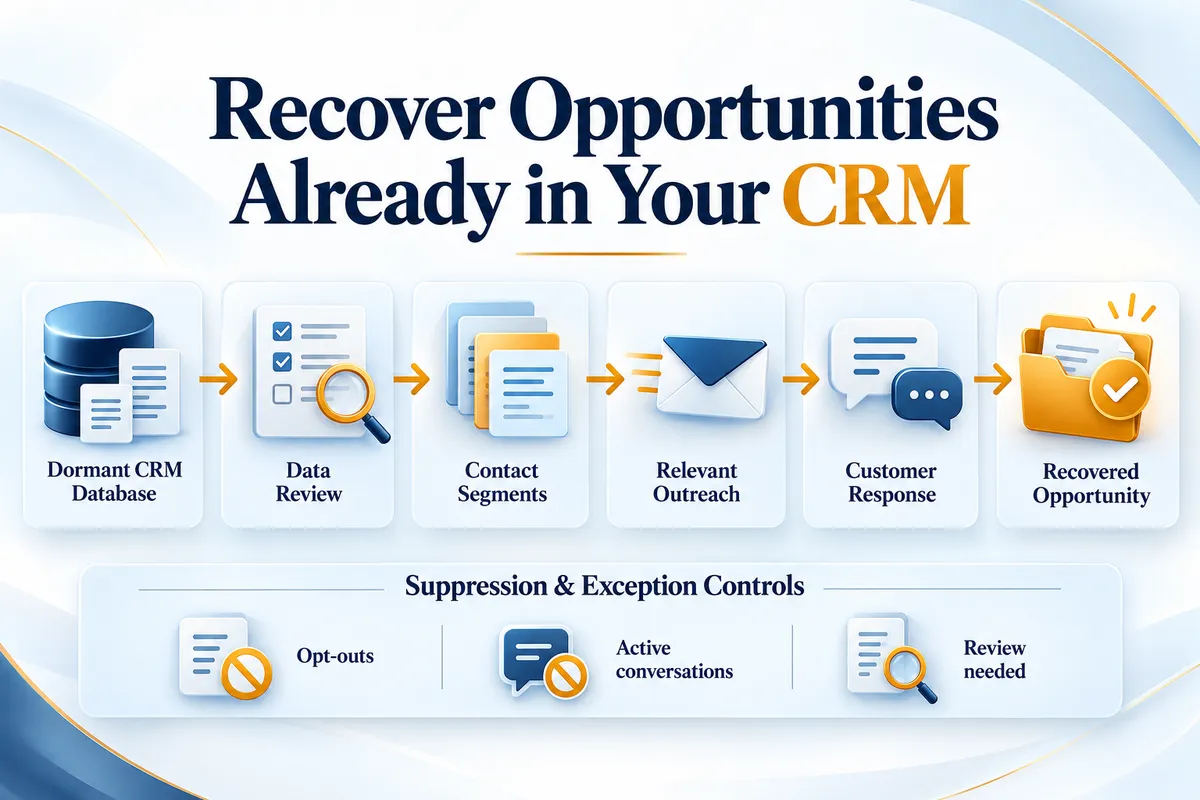
A customer reactivation campaign creates a controlled way to review those contacts, identify where renewed outreach is appropriate, and route new interest back into the sales or service process.
Reactivation Is More Than Sending an Old List a Message
A reactivation campaign should not begin by exporting every inactive contact and sending the same offer. That approach ignores the reason the contact entered the CRM, what happened afterward, and whether the business still has a valid basis for contacting the person.
The work begins with context. The business needs to know who the contact is, what they previously wanted, when the last interaction occurred, how the relationship ended, and which communication permissions or preferences apply.
Only then can the campaign select a relevant audience, message, timing, and next step.
Why Opportunities Become Inactive
Not every stalled opportunity was lost to a competitor. A prospect may have postponed the decision, changed priorities, lacked budget, missed a reply, or needed approval from someone else. A past customer may simply have reached the point when another service, renewal, check-in, or seasonal need becomes relevant.
CRM records often become inactive for ordinary operational reasons:
· The original timing was wrong
· The contact stopped responding
· The business failed to complete the next follow-up
· A proposal or quote expired without a clear outcome
· The need was deferred rather than canceled
· A former customer reached the end of a normal service interval
· The assigned owner changed or left
· The CRM record never received a final status
Reactivation works best when it addresses one of these specific conditions instead of assuming that every inactive contact wants the same thing.
Start With CRM Data Review
Before creating campaign copy, review the records that may enter the workflow. Poor data can produce duplicate messages, contact the wrong person, reopen resolved issues, or send an offer that does not fit the prior relationship.
The initial review should confirm whether the record is usable and whether the business can explain why that person belongs in the campaign.
Check for:
· Duplicate contacts
· Missing names or contact details
· Invalid email addresses or phone numbers
· Unknown lead sources
· Unclear opportunity outcomes
· Open complaints or service issues
· Existing customers who should receive a different message
· Opt-outs and communication restrictions
· Records without enough history to support relevant outreach
Do not treat cleanup as a one-time technical task. The campaign owner should define what happens when a record is incomplete, disputed, or assigned to the wrong segment.
Segment Contacts by Relationship and Reason
Segmentation makes the outreach more relevant and easier to measure. A past customer should not receive the same message as a prospect who requested a quote but never decided.
Useful segments may include past customers due for another service, qualified leads who delayed a decision, proposals without a final outcome, former customers with a related need, or contacts who engaged with a specific service but never booked.
Keep each segment tied to a clear business reason. If the team cannot explain why the contact should receive the message now, the segment is not ready.
Choose a Relevant Reason to Reconnect
The customer needs a reason to pay attention. A message that only says the business is checking in places the work back on the recipient and provides little context.
A stronger reason may be a service interval, updated availability, a changed process, a useful resource, an unresolved decision, a new option that fits the earlier request, or a genuine request to revisit the need.
The message should connect the reason to the prior relationship without overstating what the business knows. Use only the history needed to make the outreach understandable.
Build a Short, Controlled Sequence
A reactivation campaign does not need a long series of messages. Begin with one clear contact, one defined next step, and a limited follow-up rule.
The first message should identify the business, provide enough context, explain why the outreach may be relevant now, and offer a simple response path. That may be a reply, booking link, short form, or direct contact option.
If the person does not respond, the workflow may send one follow-up when appropriate. It should then stop or move the record into a different status rather than continue indefinitely.
Define Suppression and Stop Rules
The campaign should know who must not receive another message. Common suppression and stop conditions include:
· The contact opted out
· The address or number is invalid
· The person replied
· An appointment was booked
· The opportunity reopened
· The contact is already in an active sales or service conversation
· A complaint or unresolved issue requires a different workflow
· The record belongs to an excluded customer or service group
· The campaign reached its defined end date
These rules prevent overlapping outreach and help the business avoid contacting someone after the desired next step has already occurred.
Route Every Response to a Visible Next Step
A response does not create value if it sits in an inbox without ownership. The workflow should identify the reply, update the CRM, assign the correct person, and create the next action.
Positive interest may reopen an opportunity, create a qualification task, or lead to scheduling. A request for more information may need a different owner. A negative reply or opt-out should update the record immediately. An unusual response should be reviewed before automation continues.
The campaign is complete only when the business can see what happened and who owns the next step.
Use AI Where It Improves Control
AI can help summarize past interactions, classify records, draft segment-specific messages, identify reply intent, and prepare CRM notes. It should work from approved data and within defined rules.
Do not allow a system to invent customer history, assume interest, make pricing commitments, or continue outreach after a stop condition. Sensitive or ambiguous replies should be routed to a person.
The purpose of AI support is to reduce manual review and improve consistency while keeping the business accountable for the decision and message.
Measure Recovered Movement, Not Message Volume
Sending more messages does not show whether the campaign recovered useful opportunities. Measure the movement created after outreach:
· Eligible contacts reviewed
· Records excluded or corrected
· Messages delivered and failed
· Replies received
· Positive, neutral, negative, and opt-out responses
· Appointments or consultations booked
· Opportunities reopened
· Qualified opportunities created
· Sales or service outcomes attributed to the campaign
· Complaints, errors, and duplicate contacts identified
Compare results by segment, reason for outreach, channel, and timing. A campaign that performs well for past customers may not fit older unqualified leads.
Also review the final outcome. A reply is useful, but a reopened opportunity that receives no follow-up is another operational gap.
Assign a Campaign Owner
Someone should own the audience rules, message approval, launch decision, reply routing, suppression logic, reporting, and pause control.
The owner should review early responses before expanding the campaign. If the wrong contacts are included, complaints increase, or routing fails, the campaign should pause while the cause is corrected.
A backup owner should understand how to stop the workflow and handle responses when the main owner is unavailable.
Build the First Reactivation Campaign in Nine Steps
Choose one business objective, such as revisiting delayed quotes or reconnecting with past customers due for service.
Define the eligible relationship, time period, and prior outcome.
Clean the records and remove duplicates, invalid contacts, active conversations, and restricted contacts.
Create segments based on relationship, past interest, recency, service need, and outcome.
Select a relevant reason to reconnect with each segment.
Write one clear message and one limited follow-up with approved stop rules.
Route replies, bookings, opt-outs, complaints, and exceptions to visible CRM actions.
Test the campaign with controlled records before launching broadly.
Measure response quality, reopened opportunities, completed follow-up, and final outcomes before expanding.
Recover Value From the CRM Before Buying More Attention
Customer reactivation does not replace new lead generation. It gives the business another growth path by reviewing relationships and opportunities it has already paid to create.
The strongest campaigns begin with clean data, a narrow audience, a relevant reason to reconnect, controlled messaging, clear stop rules, and accountable follow-up. They do not assume that every old contact should be contacted again.
Creator Digital Media helps businesses assess CRM data, define reactivation segments, build outreach and response workflows, connect replies to ownership, and track whether renewed conversations lead to real outcomes.