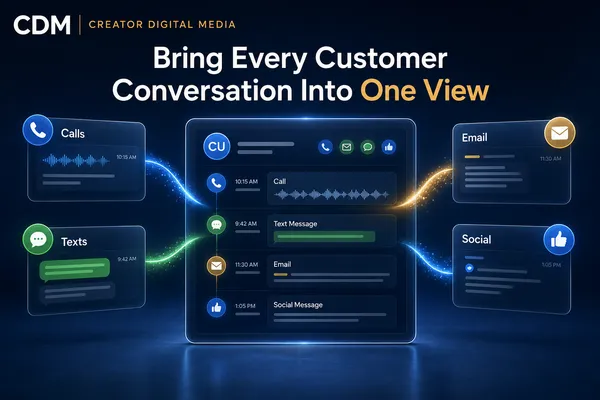
How to Bring Calls, Texts, Emails, and Social Messages Into One Customer View
A customer may call with a question, reply by text, send supporting details by email, and follow up through social media. To the customer, this is one conversation. Inside many businesses, it becomes four separate records that employees must piece together while the customer waits.
Disconnected communication creates more than inconvenience. It leads to repeated questions, missed context, duplicate follow-up, unclear ownership, and responses that contradict what another employee already said.
A unified customer view brings the conversation history, contact details, source, status, assigned owner, and next action into one place. The goal is not to force customers into one channel. It is to give the business continuity regardless of how the person chooses to communicate.
Why Customer Conversations Become Fragmented
Most channel problems develop gradually. A business adds a phone number, website form, shared inbox, texting tool, web chat, and social accounts as new needs appear. Each tool may work on its own, but the information does not automatically become one usable customer record.
Employees then search through inboxes, ask coworkers for context, rely on memory, or create notes after the fact. Two people may respond to the same request while another inquiry receives no response. A customer who changes channels may be treated like a new contact.
The issue is not the number of channels. The operating problem is the absence of a common record and consistent rules for ownership, routing, and follow-up.
What a Unified Customer View Should Contain
The customer record should provide enough context for an employee to understand what happened and what needs to happen next. At minimum, it should include:
· Customer name, preferred contact details, and consent status.
· Original source and each communication channel used.
· A chronological history of calls, texts, emails, forms, chats, and relevant social messages.
· Conversation summaries, call outcomes, attachments, and employee notes.
· Current lifecycle stage, opportunity status, and service interest.
· Assigned owner, open tasks, response deadline, and next scheduled activity.
The view should make important information easy to scan without asking employees to read every message. Recent activity, unresolved questions, commitments, and the next action deserve clear visibility.
Start With Contact Matching and Duplicate Control
A unified view depends on recognizing when activity belongs to the same person. Phone numbers, email addresses, form entries, and social profiles may not arrive in a consistent format. If the system creates a new record every time, employees still see a fragmented history.
Define which identifiers the CRM will use to match contacts and how uncertain matches will be reviewed. Establish a controlled process for merging duplicates so notes, consent records, appointments, opportunities, and message history are preserved.
Do not automatically merge records based on weak similarities such as a common name. Duplicate control should reduce fragmentation without combining two different customers.
Bring Channel Activity Into the CRM
The CRM should serve as the working customer record, even when employees use other tools to communicate. Calls should log the number, time, owner, disposition, recording or transcript when approved, and any follow-up task. Text and email replies should attach to the correct contact and opportunity. Forms, chat, and social inquiries should create or update the record and identify their source.
Not every platform exposes the same data or supports the same integration depth. Document what can be captured automatically, what requires an employee action, and what should remain in the source platform. The team needs to know where the authoritative record lives.
A connection that transfers messages but omits ownership, status, or next steps does not provide full continuity. Design the workflow around the decisions employees must make after reading the conversation.
Use One Ownership Model Across Every Channel
Centralizing messages will not solve duplicate or delayed responses unless the business also defines ownership. Each new inquiry needs an accountable person or team, a response expectation, and a clear escalation path.
Routing may depend on service type, location, language, customer stage, urgency, or current relationship. When the assigned employee is unavailable, the workflow should reassign or alert another person instead of leaving the request unattended.
Employees also need rules for transferring ownership. The record should show who is responsible now, not only who first received the message.
Keep the Conversation Continuous When the Channel Changes
Customers often change channels for a reason. A text may be easier for a quick confirmation, while email is better for documents and a phone call is better for a complex issue. The channel can change without resetting the conversation.
When an employee responds, the available history should show what the customer asked, what has already been answered, what the business promised, and whether another action is pending. The employee can then acknowledge the earlier exchange instead of asking the customer to repeat it.
If a conversation moves to a channel that cannot be fully synchronized, add a short summary and next action to the CRM. Continuity matters more than capturing every word in every system.
Use Automation to Organize, Route, and Alert
Automation can reduce administrative work around the conversation. Useful actions include:
· Creating or updating the correct contact and opportunity record.
· Applying the channel source and relevant service or campaign information.
· Assigning the inquiry according to approved routing rules.
· Sending an acknowledgment that sets a realistic response expectation.
· Creating tasks and reminders when a response or follow-up is due.
· Alerting a manager when an inquiry is unassigned, overdue, urgent, or unresolved.
· Stopping automated follow-up when the customer replies or a person takes ownership.
Automation should support context, not create more noise. Avoid sending several acknowledgments because the same person contacted the business through more than one channel.
Protect Access, Consent, and Sensitive Information
A broader customer view can expose more information to more employees, so access should follow job responsibilities. Team members should see the records and communication types needed for their work, while sensitive notes, recordings, payment information, or regulated data receive stronger controls.
Track consent and communication preferences by channel. A phone inquiry does not automatically authorize every type of promotional follow-up. Opt-outs should update the customer record quickly enough to prevent another system from continuing the sequence.
Retention, recording, and disclosure requirements vary by location and industry. The workflow should reflect the rules that apply to the business rather than relying on a tool default.
Measure Whether the Unified View Improves Service
A successful unified view should improve operating outcomes, not simply collect more data. Track first-response time by channel, unresolved conversations, duplicate contacts, missed follow-up, reassignment volume, booking or conversion rates, and customer complaints about repeating information.
Review a sample of customer journeys that crossed multiple channels. Confirm that the history remained connected, ownership was clear, and employees could identify the next action. These reviews often reveal gaps that a dashboard cannot show.
Also ask employees where they still leave the CRM to find context. Repeated workarounds are evidence that the customer view is incomplete or difficult to use.
Build One Conversation, Not Just One Inbox
A shared inbox can place messages on one screen, but a useful customer view goes further. It connects communication to the customer record, lifecycle stage, ownership, tasks, appointments, and business outcome.
Start by mapping every channel, the information each one creates, and the employees responsible for responding. Then define contact matching, routing, escalation, consent, and follow-up rules before connecting tools.
Creator Digital Media helps businesses organize customer communication, CRM records, routing logic, automation, and human handoffs. If employees are searching across systems to understand a customer, the next step is to design one dependable conversation history.



