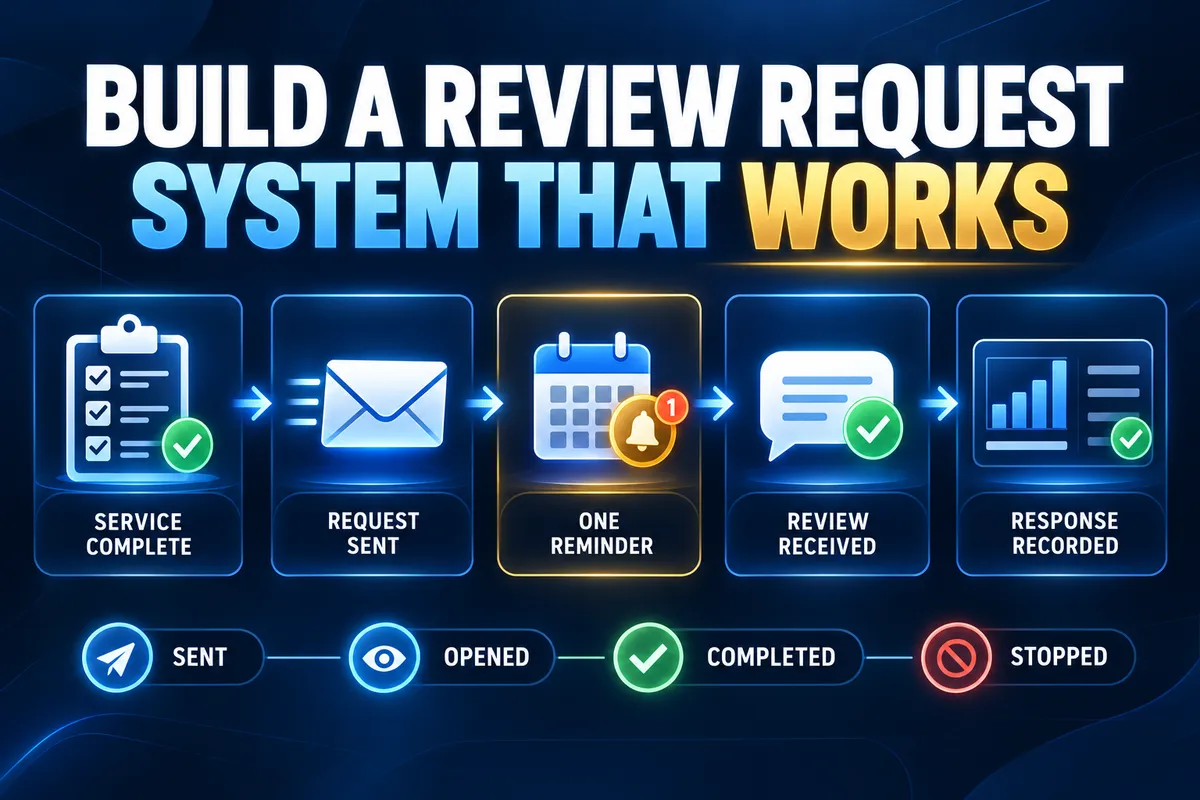
How to Build a Review-Request System Customers Will Actually Respond To
Most businesses do not have a review problem because customers refuse to share feedback. The process usually breaks because requests are sent inconsistently, arrive at the wrong time, contain too much text, or depend on an employee remembering to ask.
A review-request system should make the invitation timely, clear, easy to complete, and visible to the business. It should also respect customer choice, platform rules, consent requirements, and stop conditions.
The goal is not to pressure every customer into leaving a public rating. The goal is to create a dependable process that gives eligible customers a fair opportunity to respond after the business has completed the work.
Start With a Clear Completion Event
A review workflow needs a dependable trigger. The trigger should represent the point when the customer has received enough value to evaluate the experience.
For a service business, that may be a completed appointment, delivered project, resolved support request, paid invoice, confirmed installation, or completed onboarding milestone. The right event depends on the service and customer journey.
Avoid vague triggers such as when someone remembers or when the week slows down. The completion event should be recorded in the system and tied to the correct customer, service, location, and owner.
Choose Timing That Matches the Experience
The best request time is close enough to the completed experience that the details are still clear, but not so early that the outcome is uncertain.
Some services can request a review shortly after completion. Others need a waiting period so the customer can use the product, review the deliverable, or confirm that the issue remains resolved.
Define the timing by service type instead of applying one delay to every customer. Record the reason for each timing rule so later changes remain controlled.
Use the Channel the Customer Already Uses
Review requests are easier to notice when they arrive through an expected channel. A business may use text, email, or another approved customer communication method based on the existing relationship and applicable permissions.
Do not send the same request through several channels at once. That can make a simple invitation feel aggressive and create duplicate messages when systems do not share response status.
Choose a primary channel, define a fallback only when appropriate, and make sure opt-outs and communication preferences are respected.
Write a Direct Request
The message should explain why the customer is receiving it and make the next step obvious. A useful review request normally includes:
· The business or service name
· A brief reference to the completed service
· A clear request for an honest review
· One direct review link
· A simple thank-you
· Required identification or disclosure when applicable
Keep the message short enough to understand without scrolling through an explanation. Do not use exaggerated praise, guilt, urgency, or language that tells the customer what rating to leave.
Personalization should improve recognition, not expose sensitive information. Use only the details needed to connect the request to the completed service.
Make the Review Link Easy to Use
The request should lead to the intended review destination with as few steps as possible. Test the link on a phone and desktop before launch.
Confirm that the destination belongs to the correct business location or profile. Multi-location businesses should route each customer to the appropriate listing rather than using one general link.
Use a maintained destination field instead of copying links into many separate messages. That makes updates easier when a listing or platform path changes.
Limit the Reminder Sequence
A customer may intend to respond and forget. One polite reminder can recover some missed responses without turning the workflow into repeated outreach.
Set a reasonable delay after the first request. Do not send the reminder if the customer has already completed the review, replied, opted out, entered a service-recovery process, or should no longer receive the request.
More reminders do not automatically create better results. Repeated messages can weaken trust and increase opt-outs. Start with one and review the data before adding anything else.
Create Clear Stop Rules
Every review-request workflow should know when to stop. Common stop conditions include:
· The customer submitted a review
· The customer replied to the request
· The customer opted out
· The message failed and requires review
· A complaint or unresolved service issue was recorded
· The contact information is invalid
· The request reached its expiration date
Stop rules prevent duplicate contact and keep the business from continuing an automated request when the customer needs a different response.
Do Not Use Review Gating
Review gating occurs when a business asks only customers expected to leave a positive review, or uses private feedback to decide who receives the public review link.
A better system uses neutral eligibility rules tied to the completed service, not the expected rating. Customers should be invited consistently without being filtered according to satisfaction.
The business can still provide a direct path for support or private feedback. That path should not be used to prevent an eligible customer from receiving the same public review opportunity.
Handle Negative Feedback as a Service Issue
A critical review is not only a reputation event. It may reveal a service, communication, billing, scheduling, or expectation problem that requires ownership.
Define who receives the alert, who may respond publicly, what information must remain private, and when the issue should move into direct customer recovery. Do not argue with the customer or disclose private details in a public response.
Track the underlying issue separately from the review response. Resolving the operational cause is more valuable than polishing the wording while the same problem continues.
Track More Than the Number of Reviews
A review-request system should show whether the process works from trigger to completion. Useful measures include:
· Eligible completed services
· Requests sent
· Delivered and failed messages
· Link clicks when available and appropriate
· Reviews received
· Response rate
· Reminder volume
· Opt-outs
· Public responses completed
· Service issues identified from feedback
Compare results by service type, location, timing, and channel only when the volume supports a useful comparison. Do not treat a small number of responses as a reliable trend.
The purpose of tracking is to improve the workflow, identify failures, and confirm that customers are not being contacted incorrectly.
Assign Ownership
Automation does not remove the need for an owner. Someone should monitor delivery failures, incorrect links, duplicate requests, customer replies, public responses, and changes to platform or business rules.
The owner should also review message wording, timing, exclusions, permissions, reporting, and location routing on a defined cadence.
A backup should be able to pause the workflow when the main owner is unavailable or when the system contacts the wrong audience.
Build the First Version in Eight Steps
Define the eligible completion event.
Choose the request delay by service type.
Select the approved communication channel.
Write one short request with a direct review link.
Add one reminder with clear suppression rules.
Create stop conditions for reviews, replies, opt-outs, failures, and service issues.
Route exceptions and customer responses to an accountable owner.
Measure delivery, response, errors, and opt-outs before expanding the workflow.
Test the process with internal records and controlled scenarios before sending it broadly. Include missing contact details, duplicate services, reopened issues, wrong locations, failed messages, replies, and opt-outs.
Build the Request Around the Customer Experience
A dependable review-request system starts with the service event, not the message template. It identifies when the customer is eligible, selects the right channel and timing, makes the request easy to complete, and stops when the situation changes.
Keep the first version simple: one trigger, one request, one reminder, clear exclusions, and visible reporting. Then improve the process using actual delivery and response data.
Creator Digital Media helps businesses map post-service workflows, connect customer records, configure review requests, route exceptions, and track results without turning reputation management into repeated manual work.
Frequently Asked Questions
When should a business ask for a review?
Ask after the customer has received the completed service and has enough context to evaluate it. The exact delay depends on whether the outcome is immediate or requires time to assess.
How many review-request reminders should be sent?
Start with one reminder. Suppress it when the customer reviews, replies, opts out, enters service recovery, or becomes ineligible. Add more only when results and customer response support the change.
Can a business offer an incentive for a review?
Incentives may create disclosure, platform-policy, or credibility concerns. Check the applicable platform rules and legal requirements before considering one. Do not condition a reward on a positive rating.
Should customers with complaints receive a review request?
Use neutral eligibility rules rather than filtering customers by expected sentiment. If an active service issue makes the scheduled message inappropriate, pause the automation and address the customer’s concern. Do not use complaint handling to screen out negative public feedback.