How to Follow Up on Quotes and Proposals Without Relying on Memory
A quote or proposal can represent hours of work, a serious customer conversation, and a real revenue opportunity. Yet many businesses send the document and leave the next step to memory.
The owner plans to check back later. A salesperson adds a note to a notebook. Someone flags an email. Then other work takes priority, and the proposal sits without a clear owner or follow-up date.
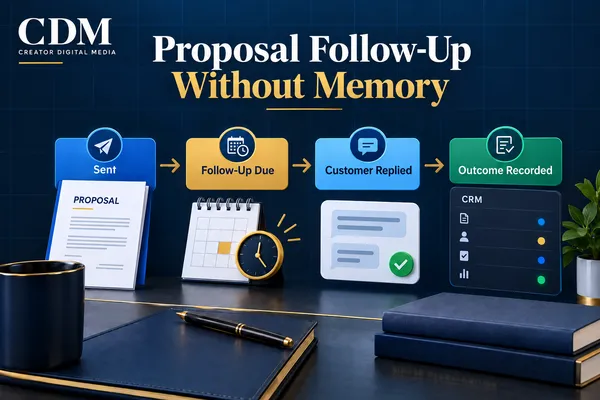
The process breaks when people must remember every next step while managing the rest of the business. A reliable follow-up system keeps each open quote visible, assigns the next action, and stops outreach when the customer decides.
Why Memory Is a Weak Follow-Up System
Memory works until the volume of conversations, quotes, and daily interruptions increases. Then follow-up becomes uneven. One prospect receives several messages while another hears nothing. The business cannot quickly see which proposals are active, stale, accepted, declined, or waiting on an internal action.
Those gaps affect forecasting, scheduling, customer experience, and team accountability. When open proposals and next actions are unclear, opportunities receive inconsistent attention.
A CRM record alone will not fix the process. Each proposal needs a status, an owner, a next action, a due date, and a recorded outcome.
Start the Workflow When the Quote Is Sent
The follow-up process should begin at a verified event: the quote or proposal was sent to the correct contact. That event can trigger the first task, update the opportunity stage, record the send date, and schedule the next review.
Before the workflow starts, confirm that the document is complete, the contact details are correct, and the customer understands how to ask questions or approve the work. Automation should not accelerate an incomplete or confusing proposal.
Useful fields may include the proposal value, service requested, sent date, expiration date, decision contact, assigned owner, next follow-up date, and current outcome. Keep the field list focused on information the business will actually use.
Create a Follow-Up Cadence That Fits the Sale
Follow-up timing should match the sale. A routine service quote may need a quick check-in, while a larger engagement with several decision-makers may require more time.
A simple starting cadence might look like this:
· Day 0: Send the proposal, confirmation message, and clear approval instructions.
· Day 2 or 3: Confirm receipt and ask whether anything needs clarification.
· Day 5 to 7: Follow up on the customer’s questions, timing, or decision process.
· Day 10 to 14: Send a final active follow-up and explain what will happen next.
· After the active sequence: Move the opportunity to a longer-term nurture path or close it with a reason.
Set the timing around the buying cycle, the proposal expiration date, and any commitments made during the sales conversation. Keep the sequence focused on a predictable next step rather than message volume.
Give Every Open Proposal an Owner
Reminders and drafted messages can be automated, but a person still owns the opportunity. That owner reviews replies, answers questions, updates the status, and decides when direct contact is needed.
Ownership becomes especially important when proposals involve custom scope, pricing questions, multiple decision-makers, or a promised revision. These situations should create a task for a person rather than continue through a generic sequence.
If ownership changes, the CRM should record the handoff. The customer should not have to repeat the history because the proposal moved to another employee.
Make Each Message Useful
A follow-up message should help the customer make progress. Repeating “just checking in” does not add context or make the decision easier.
A useful message can confirm receipt, answer a common question, restate the agreed next step, identify a missing decision, explain an expiration date, or offer a short call. The message should match what is known about the customer and the proposal.
Keep automated wording brief and easy to review. If the business does not have enough context to send a relevant message, create a task for the owner instead.
Use Different Actions for Different Signals
Open proposals should not all receive the same follow-up. Customer activity and CRM status should determine the next action.
· If the customer replies, stop scheduled messages and notify the owner.
· If the customer requests a revision, create a task and pause the sequence.
· If an appointment is booked, stop proposal reminders and move to the meeting workflow.
· If the proposal is accepted, start the payment, contract, or onboarding process.
· If the customer declines, record the reason and close the opportunity.
· If there is no response, move the record to a defined nurture or closed status after the active sequence.
These rules prevent duplicate messages and keep the CRM aligned with the customer’s actions.
Define Stop Rules Before Launch
A follow-up sequence needs clear stop conditions. Continuing after a reply, a decline, an acceptance, or a request to stop can damage trust and create avoidable complaints.
Stop active messages when the customer replies, books the next step, accepts or declines the proposal, opts out, or reaches a status that requires human review. Stop reminders when a revised proposal replaces the original.
The system should make the stop reason visible. This gives the owner confidence that the workflow ended correctly and helps diagnose failures.
Make Open Proposals Easy to See
A useful proposal view should answer a few questions without opening every record:
· How many proposals are open?
· Which ones need action today?
· Who owns each opportunity?
· How long has each proposal been waiting?
· Which proposals are accepted, declined, expired, or unresponsive?
· What value is still open, won, or lost?
A focused dashboard or saved CRM view is often enough. The purpose is to expose missing actions and stalled opportunities, not create another report no one reviews.
Measure the Follow-Up Process Alongside Sales Results
Measure more than the final sale. Track whether each proposal receives a next action, how quickly the team answers questions, how long decisions take, and why opportunities close.
Useful measures include follow-up completion rate, average time to first follow-up, proposal response rate, acceptance rate, time to decision, expired proposals, and closed-lost reasons. Review the data by service or proposal type when the buying paths differ.
Use the results to improve the process. Repeated questions may point to a weak proposal. Overdue tasks may signal an ownership or timing problem. A drop in replies after one step may mean the message or offer needs work.
Build the Smallest Reliable Workflow First
Start with one proposal type and one clear follow-up path. Define the send event, owner, timing, messages, exceptions, stop rules, and outcome statuses. Test the workflow with recent proposals before applying it across the business.
A dependable process can be short. It must keep open proposals visible and give every opportunity an appropriate next step.
Creator Digital Media helps businesses map proposal workflows, connect follow-up to CRM records, and build the tasks, messages, handoffs, and reporting needed to keep opportunities moving without relying on memory.



