How to Keep Lead Follow-Up Running When Your Team Is Short-Staffed
How to Keep Lead Follow Up Running When Your Team Is Short Staffed
A holiday, planned absence, or sudden workload increase can expose a weakness in lead follow-up. An inquiry arrives, the usual owner is unavailable, and everyone assumes someone else will respond. The CRM may show a new record while the next action remains unclear.
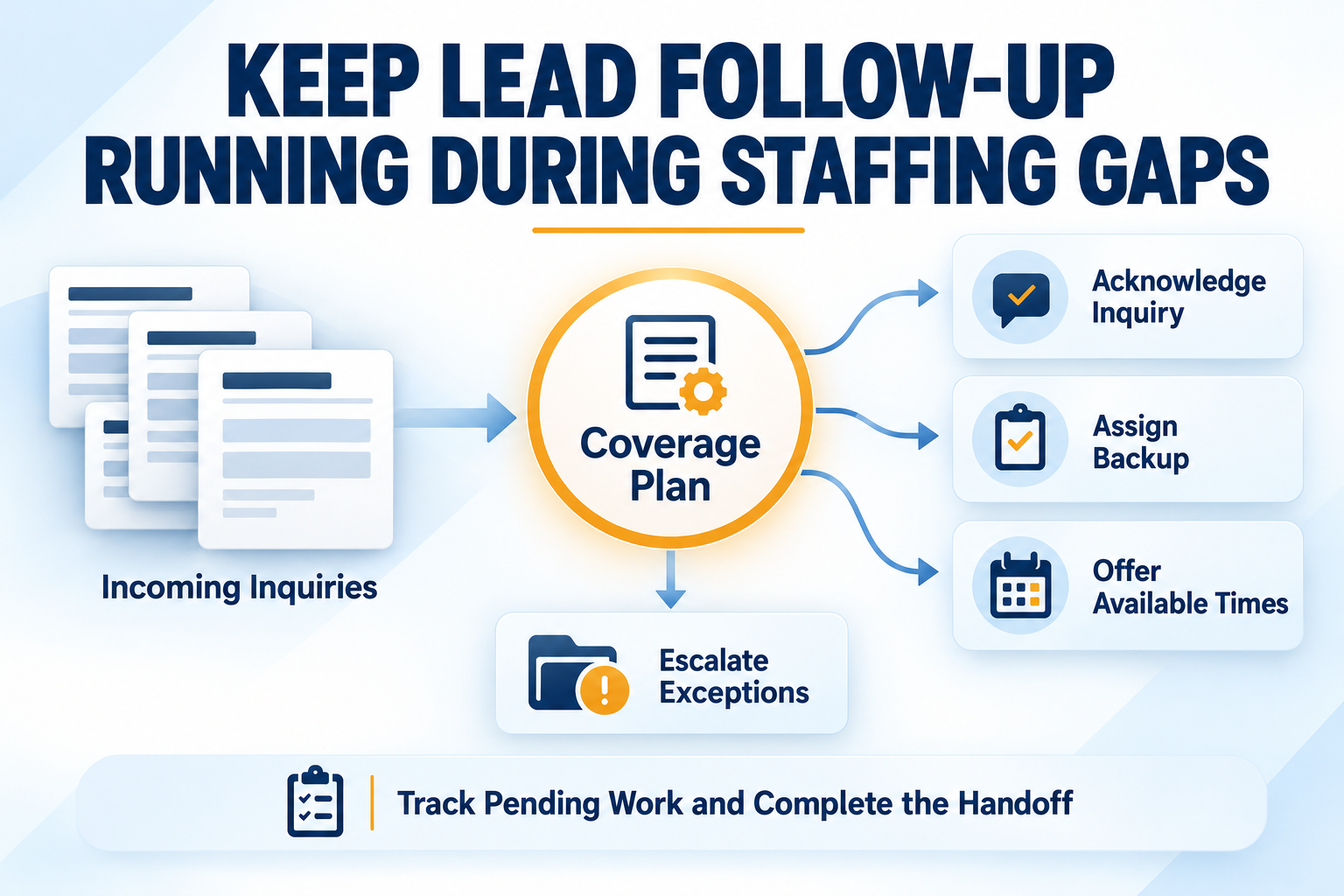
A coverage plan gives the business a way to manage that gap. It defines what can happen automatically, who handles work requiring judgment, and what the lead should expect while capacity is limited.
The objective is to preserve an accurate record and a reliable next step. Automated acknowledgment can help, but it does not replace a qualified response or create availability that the team does not have.
Map the Coverage Gap Before Changing Automation
Identify when normal staffing will change, which channels receive inquiries, and what work depends on the unavailable people. Include forms, calls, chat, email, social inquiries, and replies to existing follow-up sequences where the business uses them.
Check the tasks behind the first response. Qualification, pricing, proposal questions, appointment changes, and service-specific requests may each need a different owner. A backup who can monitor an inbox may not have authority to approve a quote.
Write down the coverage dates, operating hours, relevant time zones, available staff, and known limits. Separate planned coverage from assumptions. If no one can provide a certain response during the gap, the workflow should set an appropriate expectation rather than route work to an unattended queue.
Define the Minimum Response the Business Can Maintain
Choose what the business can reliably provide during the reduced-coverage period. That may include recording the inquiry, confirming receipt, collecting essential details, offering available appointment times, and assigning a later response task.
Make the difference between acknowledgment and resolution clear. A message confirming receipt should not say that a specialist is reviewing the request unless someone has actually taken that action.
Set response expectations the team can meet, including what happens outside coverage hours. Use a realistic date or timeframe when it can be maintained. Avoid a general promise of immediate assistance when the next qualified person will not be available until later.
Make Acknowledgment Useful
A useful acknowledgment identifies the business, confirms the request was received, and explains the next step. It may provide an available booking option or ask for the minimum information needed to prepare a response.
Keep the message consistent with the channel and recorded preferences. A form submission should not automatically trigger several messages across unrelated channels. Review existing sequences so the same inquiry does not receive conflicting promises.
Update temporary messages when the coverage period ends. An outdated holiday notice can mislead leads after normal operations resume. Give someone responsibility for the start and end of the temporary settings.
Route Work to a Backup With Clear Authority
Define a primary route and a backup route for each inquiry type. The receiving person should see the contact record, inquiry details, previous messages, and the action expected. Routing is incomplete until the task appears somewhere the backup monitors.
Decide what happens when a task is unclaimed or passes its review time. Escalation may assign another owner or notify a designated manager. It should not repeatedly notify unavailable people without changing the task’s status.
If the business cannot assign a qualified backup, use a visible holding status and an agreed review date. Do not leave the task assigned to an absent person as if ordinary coverage were still in place.
Offer Only Appointment Times the Team Can Support
Review calendars before routing more leads to booking. Check leave, service duration, preparation time, location, time zones, and any shared resources required for the appointment. Confirm that connected calendars reflect the intended availability.
A booking confirmation should describe the appointment accurately. If it is an initial discussion rather than a confirmed service visit, say so. Do not allow automation to imply that a requested date or service commitment has been accepted when it has not.
Test cancellations and rescheduling as well. A calendar may accept a booking correctly while change requests still route to someone on leave. Keep those replies within the same coverage plan.
Separate Delayed Coverage From Lead Nurture
A prospect waiting because your team is unavailable has a different problem from someone who is not ready to buy. Keep the reason for the delay visible so the business does not send a generic nurture sequence instead of completing the promised response.
When the customer’s own timing is the issue, our guide “What Should Happen to Leads That Are Interested but Not Ready to Buy?” explains how to manage a relevant longer-term follow-up path.
Define Exceptions That Need Human Review
Identify requests that should leave the standard workflow. Examples may include complaints, pricing disputes, unusual service requirements, sensitive information, or a reply asking to speak with someone. Route them to an owner with the appropriate authority.
Use urgency rules that match the service. If the business cannot provide urgent assistance, make that limit clear and use an approved alternative instruction where one exists. Do not create the impression that an unattended channel is an emergency response service.
Record the reason for escalation and pause incompatible automated messages. A lead discussing a concern should not continue receiving reminders that assume no conversation has started.
Keep a Small Coverage Queue Visible
Use a shared CRM view or task queue that shows new inquiries, unclaimed work, pending responses, booked appointments, and escalated items. Include ownership and the next review time so the team can distinguish work waiting for a decision from work that has been forgotten.
Queue condition | Required action | Coverage check |
New inquiry received | Record details and send approved acknowledgment | Confirm the record and task were created |
Task remains unclaimed | Use the defined backup or escalation route | Check the receiving owner can act |
Lead replies with a question | Pause incompatible reminders and assign a response | Keep the conversation history visible |
Appointment is booked or changed | Update the record and responsible owner | Verify current availability and change handling |
Qualified response must wait | Record the reason and promised next step | Set a review date the team can meet |
Use AI Within the Coverage Plan
AI can summarize an inquiry, categorize a request, retrieve approved information, or prepare a draft for the backup to review. These uses can reduce preparation work when the source records and routing rules are reliable.
Keep decisions about pricing exceptions, refunds, service commitments, and uncertain requests under human review. AI should not invent availability, claim someone accepted a task, or promise a response time outside the approved coverage plan.
Provide a clear fallback when the system cannot classify a request or access the required information. An uncertain request should create a visible review task rather than disappear into a default response.
Test the Gap Before It Starts
Use controlled records to test an inquiry during coverage hours, one outside those hours, an unavailable primary owner, a missing backup, a reply, and an appointment change. Confirm the actual destination of every task and notification.
Check stop rules and duplicates across channels. Booking, a reply, or a changed preference should affect pending messages when required. Also test what happens if an integration fails or a notification does not arrive.
Make sure the person monitoring the queue knows how to pause a failing workflow and handle pending records manually. Keep the instructions available to the backup rather than only in the absent owner’s notes.
Review Workload During Reduced Coverage
Track new inquiries, acknowledgment failures, unclaimed tasks, overdue responses, escalations, and appointment changes. An acknowledgment sent successfully does not mean the inquiry received a qualified response.
Compare workload with the capacity actually available. If the queue grows beyond what the team can handle, adjust routing, booking availability, or the stated response expectation. Adding more reminders will not resolve a staffing bottleneck.
Plan the Return Handoff
Before normal coverage resumes, review what is still pending and who owns each item. Include customer commitments, open questions, exceptions, and appointments created during the gap.
End temporary notices and routing rules at the planned time, then confirm they changed correctly. Avoid moving every record back to the original owner automatically if another person is already handling the conversation.
Check that no inquiry remains in a temporary holding status without a next action. The handoff is complete when pending work has an active owner and the customer-facing expectations still match what will happen.
Build Coverage Around a Reliable Next Step
Lead follow-up can remain organized during a staffing gap when the business defines its limits before the work arrives. Clear acknowledgment, available booking times, backup ownership, and visible exceptions give the team a process it can maintain.
Creator Digital Media provides AI Systems Setup to help businesses connect lead capture, acknowledgment, routing, booking, and escalation into a tested workflow with accountable follow-through.