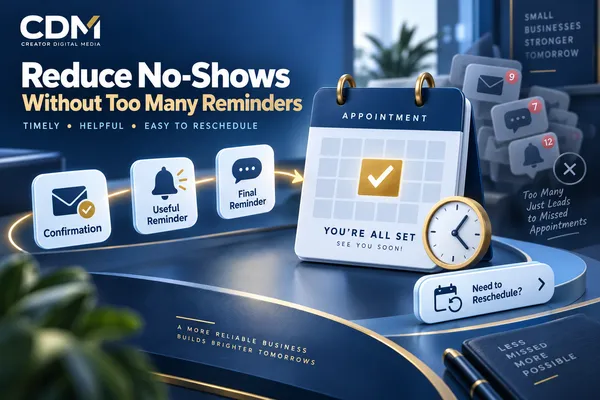
How to Reduce No-Shows Without Sending Too Many Reminders
Appointment reminders can reduce no-shows, but sending more messages is not automatically better. Customers are more likely to ignore a reminder sequence when every message repeats the same information, arrives too frequently, or does not give them a useful next step.
The goal is not to keep the appointment visible at any cost. The goal is to help the customer remember the commitment, prepare for it, and act early if the scheduled time no longer works.
A strong reminder process usually combines immediate confirmation, a limited number of timely reminders, clear preparation details, and an easy way to confirm, reschedule, cancel, or ask for help. Every message should reflect the current appointment status so the customer never receives instructions that are no longer accurate.
Start With the Reasons Customers Miss Appointments
No-shows do not all have the same cause. Some customers forget. Others book far in advance and lose track of the date. A customer may be uncertain about the location, meeting link, required documents, payment, or how long the appointment will take. Others know they cannot attend but postpone contacting the business because changing the appointment feels inconvenient.
Review the customer journey before changing reminder frequency. Look at when appointments are booked, how far in advance they occur, which appointment types have the highest no-show rate, and whether customers receive clear confirmation. Check whether the rescheduling path works on a mobile device and whether replies reach a person or monitored inbox.
This analysis helps the business correct the source of missed appointments. If customers cannot find the meeting link, another reminder with the same vague wording will not solve the problem.
Send an Immediate Confirmation That Can Stand on Its Own
The first message should arrive immediately after booking. It should confirm the service, date, time, time zone, location or meeting link, expected duration, and any preparation requirement. It should also provide a clear path to reschedule or cancel within the business rules.
Treat confirmation as the foundation of the reminder sequence. If the initial message is incomplete, every later communication must compensate for missing information. A complete confirmation also gives the customer something reliable to search for in email or text history.
When possible, let the customer add the event to a personal calendar. Calendar placement often provides more durable visibility than repeated business messages.
Use Reminder Timing That Matches the Appointment
Reminder timing should reflect the appointment lead time, value, preparation requirements, customer behavior, and consequences of an empty time slot. A short virtual consultation booked tomorrow may need a different sequence from an onsite service scheduled three weeks ahead.
For many service businesses, a useful starting structure is confirmation at booking, one advance reminder early enough for the customer to make changes, and one final reminder close enough to support arrival. This is a starting point, not a universal rule. The business should test timing against actual attendance and customer responses.
Avoid placing multiple messages close together unless a customer action is still required. An email and text sent at the same moment can feel like duplication rather than support.
Give Each Message a Distinct Job
A reminder earns attention when it helps the customer do something. Assign a clear purpose to each message:
· Confirmation: verify the appointment details and explain what happens next.
· Preparation reminder: surface unfinished intake, payment, documents, directions, or instructions.
· Final reminder: confirm the immediate details and make the arrival or connection step easy.
· Change notice: replace outdated information after a reschedule, cancellation, location change, or staff reassignment.
Do not send four versions of “Remember your appointment.” The sequence should become more relevant as the scheduled time approaches.
Make Rescheduling Easier Than Disappearing
Some missed appointments can be converted into rescheduled appointments when customers have a simple alternative. Include a visible reschedule or cancellation option in confirmations and reminders when self-service changes are appropriate.
The rescheduling workflow should enforce notice periods, deposits, service availability, staff qualifications, and limits on repeated changes. Once the customer chooses a new time, update the appointment record, connected calendars, staff assignment, and remaining messages. Send a replacement confirmation that clearly states the new details.
Customers with urgent, sensitive, or policy-related situations still need a human-help path. Automation should reduce friction without preventing reasonable exceptions.
Stop Messages When the Appointment Status Changes
One of the fastest ways to make reminders feel excessive is to continue sending them after a customer confirms, reschedules, cancels, or completes a required step. Every reminder should check the current appointment status before it is sent.
The workflow should suppress outdated messages and move the customer to the correct path. A cancellation may require a confirmation of cancellation. A reschedule needs a new sequence. Completed intake should remove the request to finish the form. A staff member who changes the appointment should trigger the same updates as a customer using self-service.
This requires the calendar, CRM, forms, payment records, and communication tools to share reliable status information. Disconnected systems create contradictory messages and additional work for employees.
Choose Channels Based on Purpose and Permission
Email works well for detailed instructions, documents, addresses, and preparation information. Text messages are useful for concise, time-sensitive notices when the customer has consented to receive them. Phone calls may be appropriate for high-value appointments, sensitive services, or customers who have not responded to a required action.
Use channel preferences and consent records where available. Keep text messages brief and direct. Do not repeat a full email inside a text simply because both channels are connected.
Provide a monitored reply path. A reminder that invites a response but sends replies to an unattended number creates frustration and may leave an important change unresolved.
Use Confirmation Selectively
Requiring customers to confirm every appointment can help in some settings, but it can also add friction. Decide what a confirmation response changes. If the business will hold the appointment regardless, the response may provide little operational value.
Confirmation is more useful when it affects staff preparation, a waitlist, route planning, resource allocation, or an escalation path. Define what happens when the customer confirms, declines, or does not respond.
Do not treat silence as a confirmed cancellation unless that policy has been clearly communicated and is appropriate for the service.
Create a Separate Recovery Path for No-Shows
When an appointment time passes, record the outcome before sending follow-up. A customer who attended should not enter the same sequence as someone who did not appear.
A no-show recovery message should acknowledge the missed appointment without sounding accusatory, explain the available next step, and provide a direct rebooking or contact option. If fees or deposit rules apply, state them clearly and consistently.
Repeated no-shows may require a different booking policy, such as a deposit, manual approval, shorter booking window, or direct employee contact. The workflow should flag the pattern for review rather than automatically sending a longer reminder sequence.
Measure Attendance and Message Performance Together
Track whether the reminder process improves the appointment outcome without creating customer fatigue. Useful measures include:
· No-show rate by appointment type, location, employee, booking source, and lead time.
· Confirmation, rescheduling, and cancellation rates.
· Time between a reminder and a customer action.
· Delivery failures, opt-outs, replies, and requests for help.
· Staff time spent correcting appointments or contacting customers manually.
· Recovered appointments and completed rebooking's after a no-show.
Test one variable at a time, such as message timing, channel, or wording. A lower no-show rate is valuable, but not if it is accompanied by rising opt-outs, complaints, or confused replies.
Build a Reminder Sequence Around Customer Action
A reliable reminder strategy is timely, useful, and responsive to customer action. It gives the person enough information to keep the appointment and a clear route to change it when necessary.
Start with the current process. Identify which details customers ask for, when changes usually occur, where replies are handled, and which appointment statuses stop or redirect communication. Then design the smallest sequence that addresses those needs.
Creator Digital Media helps businesses connect appointment records, reminders, rescheduling, customer communication, and follow-up so the process remains accurate from booking through outcome.
Frequently Asked Questions
How many appointment reminders should a business send?
There is no universal number. A useful starting point is immediate confirmation, one advance reminder, and one final reminder, adjusted for the appointment type, lead time, customer behavior, and preparation requirements.
When should appointment reminders be sent?
Send the first confirmation immediately. Schedule later reminders early enough for the customer to prepare or reschedule and close enough to the appointment to support attendance. Test the timing against actual results.
Should appointment reminders use text, email, or both?
Use the channel that fits the message and the customer’s permission. Email is suited to detailed instructions, while text works well for concise, time-sensitive information. Avoid sending duplicate messages without a clear reason.
How can businesses reduce no-shows beyond reminders?
Improve confirmation details, simplify rescheduling, collect deposits when appropriate, shorten excessive booking windows, resolve incomplete intake, monitor replies, and create a defined recovery path for missed appointments.



