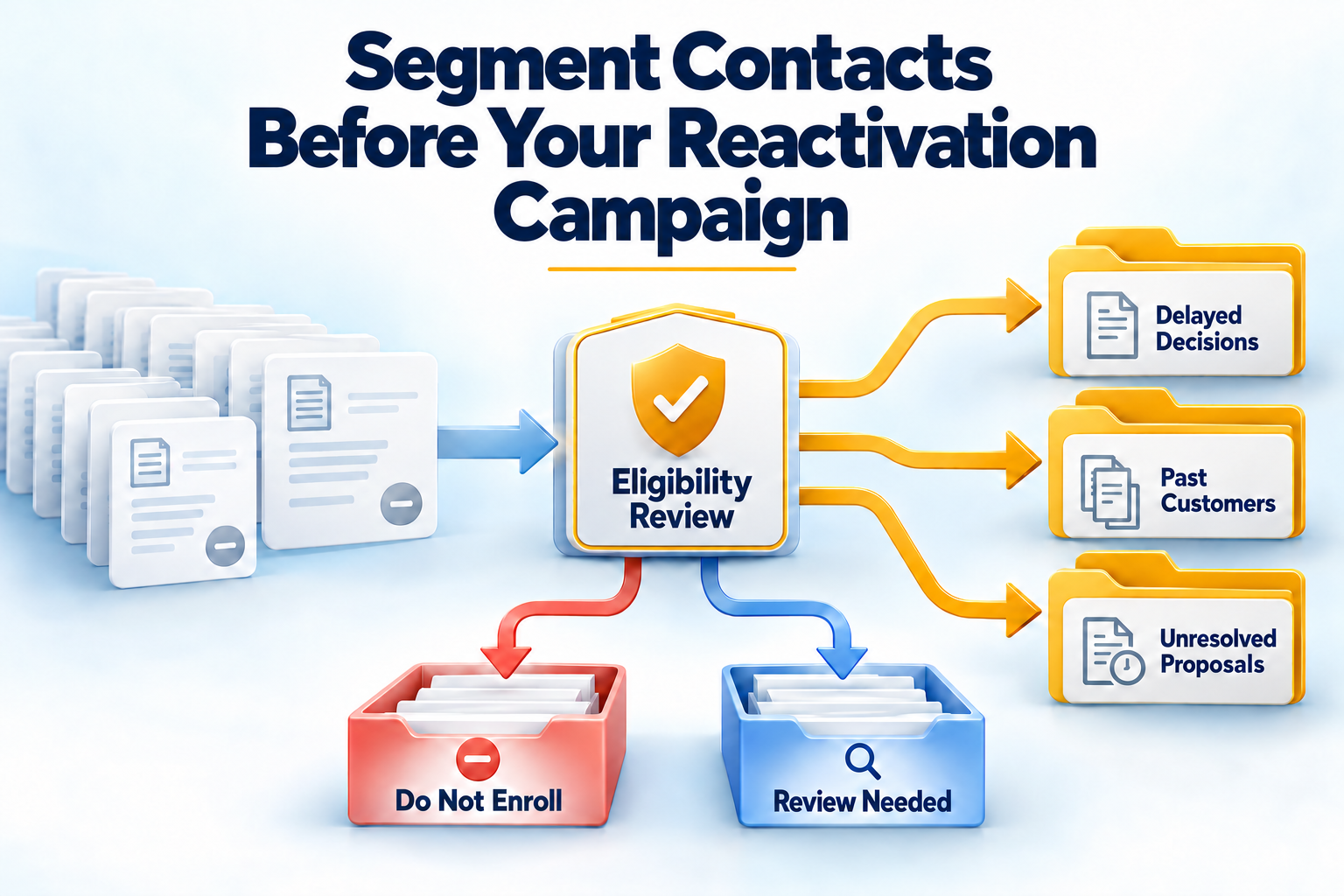
How to Segment Inactive Contacts Before Starting a Reactivation Campaign
An inactive CRM record can mean several different things. A past customer may be due for another service. A prospect may have postponed a decision. An old quote may have no recorded outcome. Another contact may have asked the business to stop sending messages.
Putting these records in the same campaign creates avoidable mistakes. The message may refer to the wrong relationship, repeat an offer that was declined, or arrive while another team member is already handling the account.
Contact segmentation gives the business a way to decide who belongs in a reactivation campaign and what would make the outreach relevant. Each group needs a clear entry rule, reliable supporting information, an approved next step, and a way to leave the campaign when circumstances change.
Define Inactive Before Building the List
Start by describing the business event that makes a record inactive. That might be a quote awaiting a decision beyond the normal sales cycle, a former customer who has passed a usual service interval, or a qualified inquiry that ended with an agreed request to reconnect later.
A period without contact is only one signal. The appropriate interval depends on the service, buying process, customer expectations, and recorded history. A company with annual service visits will need different rules from a business that normally completes a sale within a week.
In the companion guide, How Customer Reactivation Campaigns Recover Opportunities Already in Your CRM, we explain the wider campaign workflow. Segmentation is the work that determines which records can enter that process.
Apply Exclusions Before Audience Selection
Create the exclusion rules before choosing attractive opportunities. Records with opt-outs, invalid contact details, active sales conversations, unresolved complaints, or conflicting account information need separate handling. Some should be excluded; others should go to an owner for review.
An old inquiry or past purchase does not establish that every channel is appropriate for renewed outreach. Check the recorded permissions, preferences, restrictions, and the business requirements for the intended channel. If eligibility cannot be established, keep the record out of automated enrollment until reviewed.
Apply exclusions across the campaign, including at the point of sending. A contact can become ineligible after a list is prepared. Keeping an outdated export as the only source of truth makes that change easy to miss.
Use Five Fields to Create Useful Segments
Begin with the information needed to explain the relationship and the reason for reconnecting. A small set of reliable fields is more useful than a detailed classification built from assumptions.
Relationship: Distinguish past customers, qualified prospects, former customers, and contacts whose relationship is still unknown. A purchase history and an unfinished inquiry call for different wording.
Recency: Record the last meaningful interaction and the next relevant date. An automated email delivery is not equivalent to a customer reply or an agreed follow-up date.
Past interest: Identify the service or problem the contact actually discussed. Use confirmed notes or recorded requests. A page visit alone should not be treated as a confirmed buying need.
Prior outcome: Separate delayed decisions, declined offers, completed services, unresolved proposals, and records with no documented result. Unknown outcomes need investigation before tailored copy is written.
Outreach eligibility: Record whether the intended channel is approved, restricted, or awaiting review. Keep a source and date for the information where available so the team can check it.
Add other fields only when they change the message or handling. Account owner, geography, service availability, and the reason for a delay may matter. A field that no one maintains should not quietly decide who receives outreach.
Write Segment Rules Another Person Can Follow
A segment name such as Old Leads leaves too much open to interpretation. Write a rule that identifies the relationship, relevant event, timing, exclusions, and intended action.
For example, a delayed-decision segment could include qualified prospects who requested a particular service, postponed the purchase, and reached their recorded follow-up date. Exclude records that opted out, already reopened, or entered another active conversation. Put missing dates or unclear notes into review.
Give each record one primary campaign assignment. A contact may match several descriptive groups, but should not enter overlapping outreach sequences. Define which campaign takes priority and where the business records that assignment.
Match Each Segment to a Reason and Next Step
The segment should explain why a message makes sense now. Past customers due for a recurring service may receive an availability check. A prospect who delayed a decision may be asked whether the timing has changed. An unresolved proposal may need a status confirmation before another offer is sent.
These are examples of operating rules, not instructions to enroll every matching contact automatically. Eligibility, current circumstances, and message approval still apply.
Example group | Reason to reconnect | Next step |
Delayed decision with an agreed follow-up date | The recorded date has arrived | Confirm whether the need and timing still apply |
Past customer approaching a documented service interval | The service may be due again | Offer a service check or scheduling option |
Proposal with no documented outcome | The business needs an accurate status | Ask whether the proposal remains relevant |
Record with conflicting notes or missing history | Context is insufficient | Assign internal review before any campaign |
Keep Uncertain Records Visible
Unknown information needs its own handling. Do not quietly place a contact into the nearest available segment or fill gaps with a guess. Use a review status and record the missing detail, responsible owner, and action needed.
A record may need a duplicate check, a confirmed service history, clarification of the prior outcome, or a review of channel eligibility. If the team cannot resolve the uncertainty, the record should remain outside the campaign.
Review records at the account level when several contacts belong to the same business. One contact may be discussing a proposal while another appears inactive. Without that check, separate workflows can create conflicting messages to the same customer organization.
Use AI to Assist Classification
AI can summarize recorded conversations, suggest a prior-outcome label, and flag records that lack enough information. Its output should point back to the supporting CRM history so the reviewer can check the suggestion.
Do not allow AI to invent customer intent, create permission records, or convert an ambiguous note into a confirmed buying signal. Keep restricted fields under defined controls. A person should review uncertain classifications and approve the first audience before enrollment.
Test Membership Before Launching Outreach
Test the rules with controlled records before sending customer messages. Include an eligible delayed decision, an opted-out contact, an active opportunity, a duplicate, a record with missing history, and a contact matching more than one segment.
Check both inclusion and exclusion. A list can contain the right contacts while still failing to remove the wrong ones. Confirm that updates to a reply, booking, status, or restriction remove the record from any pending outreach when required.
Review a sample of the actual proposed audience as well. Read the underlying notes and confirm that the planned message matches the relationship. If the sample exposes a repeated data problem, correct the rule or records before widening enrollment.
Give Every Segment an Owner
Assign someone to maintain the segment definition, approve the message, review exceptions, and monitor membership changes. Document who takes over when that person is unavailable.
The same plan should say where responses go. Positive interest needs a visible sales or service action. A request to stop needs an immediate record update and suppression from further campaign outreach. Complaints and unclear replies should reach an appropriate reviewer.
A segment is ready when the business can explain why each record belongs, what the contact will receive, and who will handle the response.
Measure the Quality of the Audience
Start with the number reviewed, excluded, corrected, and awaiting review. After launch, compare reply quality, reopened opportunities, completed follow-up, opt-outs, and complaints by segment. Define the reporting period and what each measure includes so the results can be compared consistently.
Keep delivery failures separate from a lack of interest. Also distinguish an acknowledgment from a qualified opportunity. A large segment with weak context may produce more activity while leaving the team with more manual correction.
Build the First Segment in Seven Steps
Choose one relationship and one business reason to reconnect.
Define inactivity using the service cycle or a recorded customer event.
Apply exclusion rules and verify the intended outreach channel.
Check relationship, recency, past interest, prior outcome, and eligibility.
Write the membership rule and prevent overlapping enrollment.
Assign uncertain records, response handling, and ongoing maintenance to an owner.
Test the rules, review the proposed audience, and approve a limited first campaign.
Prepare the Audience Before Writing the Campaign
Contact segmentation makes reactivation more specific. It connects the earlier relationship to a relevant reason for renewed outreach and gives the team a clear basis for including, reviewing, or excluding each record.
Creator Digital Media provides AI Growth Support to help businesses review CRM data, define contact segments, connect campaign rules to response handling, and measure whether renewed conversations receive the right follow-through.