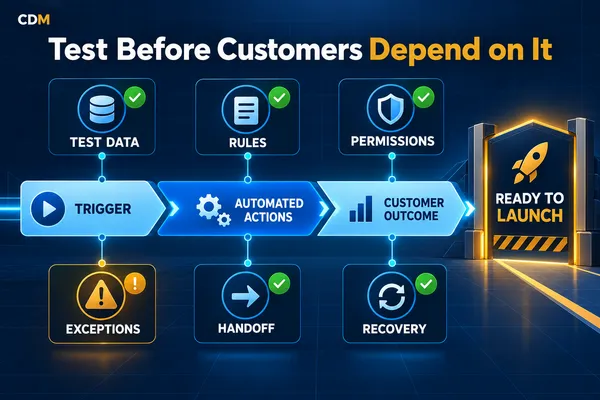
How to Test an Automated Workflow Before Customers Depend on It
An automated workflow is not ready for customers because the normal path worked once. A form can submit correctly, a confirmation can arrive, and a CRM record can update while the workflow still fails when information is missing, a customer replies late, an integration stops, or a transfer reaches no one.
Testing should prove more than whether each step can run. It should confirm that the workflow uses the right information, follows its approved rules, protects access, handles exceptions, gives employees enough context, and can be stopped or recovered when something goes wrong.
The safest approach is to test the workflow as an operating process before treating it as a finished automation.
Define What the Workflow Must Accomplish
Begin with the business outcome. State what starts the workflow, what the customer should experience, what the business must record, and what successful completion means.
For an appointment workflow, success may mean that an eligible customer selects an available time, receives accurate confirmation, appears in the correct calendar, creates or updates the correct CRM record, and generates the required employee notification. That definition is more useful than saying the booking automation works.
Also define what the workflow must not do. It should not create duplicate contacts, expose restricted information, book unavailable time, continue after an opt-out, or send a message after the customer has already completed the next step.
Map the Complete Path Before Testing
Document the workflow in the order the system will execute it. Include the trigger, required information, decision rules, actions, integrations, owners, stop conditions, and recorded outcome.
· Trigger and entry requirements
· Required fields and data sources
· Decision branches and routing rules
· Messages, tasks, updates, and external actions
· Permissions and approval points
· Human handoff and escalation conditions
· Stop rules and duplicate-prevention logic
· Success, failure, and recovery outcomes
This map becomes the testing reference. Without it, reviewers may confirm isolated steps while missing a broken handoff or an action that happens in the wrong order.
Build Test Cases Around Real Conditions
A useful test plan includes normal cases, boundary cases, and failures. Use realistic sample records but do not use sensitive customer information unless the environment and purpose are approved.
Start with the normal path, then deliberately change one condition at a time. This makes it easier to identify which rule or integration caused the result.
· Complete and valid information
· A missing required field
· An invalid email address or phone number
· A duplicate contact or repeated submission
· A customer who already exists in another pipeline stage
· A late reply after the workflow has advanced
· A booking request when no approved time is available
· A message failure or disconnected integration
· An opt-out, cancellation, decline, or request for a person
· A request outside business hours or outside the approved service area
Verify Data at Every Step
Check what information enters the workflow, how it changes, and where it is stored. A message can reach the customer while the CRM record remains incomplete or incorrect.
Verify field mapping, contact matching, source attribution, timestamps, owners, pipeline stages, consent records, task due dates, appointment details, and final outcomes. Confirm that updates occur on the intended record and that blank or conflicting values do not silently replace reliable information.
Test repeated submissions and simultaneous actions. The workflow should have a clear rule for duplicates instead of creating multiple contacts, tasks, opportunities, or messages.
Test Every Decision Branch
If the workflow routes by service, location, availability, urgency, customer type, or qualification, test every branch. Do not assume a branch works because another path uses similar logic.
Confirm what happens when a value does not match any approved condition. The workflow should create a defined exception, route to a review queue, or stop safely. It should not guess which branch is closest.
Review the order of the rules as well. A broad condition placed before a specific one can capture records that should have followed a different path.
Check Permissions and Action Limits
Automation should have only the access required for its approved job. Test which records, calendars, inboxes, files, and fields it can read or change.
Pay particular attention to actions that create commitments: changing pricing, issuing refunds, sending sensitive messages, modifying appointments, approving exceptions, or updating final status. Those actions may require a specific role or a human approval step.
Confirm that unauthorized users cannot change workflow rules, credentials, message templates, approval limits, or connected accounts.
Test Customer Messages in Context
Review every customer-facing message with the actual information it will contain. Check names, dates, times, locations, links, contact details, instructions, and sender identity.
Test the sequence as a customer would receive it. A single message may be accurate but still create confusion when it arrives after another channel, repeats information, or continues after the customer replies.
Verify channel-specific consent, disclosure, privacy, and opt-out requirements with qualified counsel where applicable. The workflow should record the customer’s choice and stop the relevant communication when required.
Prove the Human Handoff
A workflow is not dependable if it detects an exception but cannot reach the right person. Test the handoff under normal hours, after hours, employee absence, and transfer failure.
The employee should receive the customer’s request, relevant history, information already collected, actions already taken, reason for escalation, and required response time. The customer should receive a clear expectation rather than being left inside an automation loop.
Confirm who owns the item after the handoff and what returns the record to the automated path. Without that rule, the system may contact the customer again or leave the record unresolved.
Confirm Stop Rules
Every sequence needs conditions that prevent unnecessary or incorrect actions. Test whether the workflow stops, pauses, or changes when the customer:
· Replies to the message
· Books or reschedules an appointment
· Accepts or declines a proposal
· Completes a form, payment, or document request
· Opts out or asks not to be contacted
· Requests a person
· Submits a complaint or sensitive question
Also test internal changes such as an employee closing the opportunity, changing the owner, correcting the contact, or pausing the campaign. A stop rule is only useful if it responds quickly enough to prevent the next scheduled action.
Create Useful Logs and Failure Alerts
The system should record what happened without forcing an employee to reconstruct the event from several tools. Logs should show the record, action, time, result, and error when one occurs.
Create alerts for failures that require action, such as an unavailable calendar, disconnected integration, rejected message, missing owner, permission error, or action that exceeded its retry limit. Route each alert to a named owner with a response expectation.
Avoid sending an alert for every successful step. Excessive notifications can hide the failures that matter.
Prepare a Rollback and Recovery Plan
Before launch, decide how to pause the workflow without disrupting unrelated business activity. Record who has authority to disable it and how employees will handle new work while it is paused.
Define how to correct partial failures. If a customer received a message but the CRM did not update, the recovery action differs from a failure that prevented the message from sending. Avoid rerunning an entire sequence when doing so would duplicate customer contact.
Keep the prior approved configuration available when possible. Document credentials, dependencies, templates, and field changes required to restore the workflow safely.
Release in Controlled Stages
After internal testing, launch to a limited group, channel, location, service, or time window. Monitor the first live records closely and compare them with the expected results.
Set clear criteria for expansion. These may include accurate record creation, successful actions, acceptable handoff time, no duplicate contact, low manual correction, and resolved exceptions. The criteria should reflect the workflow’s risk and customer impact.
Do not expand because the first few cases looked normal. Review enough variation to confirm that the exception paths and employee response process also work.
Measure the Workflow After Launch
Testing continues after release because customer behavior, staffing, data, and connected tools change. Monitor measures that reveal both results and reliability:
· Successful completion rate
· Failures and retries
· Duplicate records or messages
· Manual corrections
· Handoff volume and response time
· Customers reaching a dead end
· Opt-outs, cancellations, and complaints
· Stage accuracy and final outcomes
Review failed and unusual cases on a regular cadence. A workflow can remain technically active while producing weaker records, slower handoffs, or more customer confusion.
Use a Final Pre Launch Review
Confirm the intended outcome and workflow map.
Run the normal path from start to finish.
Test every decision branch and stop rule.
Test missing, invalid, duplicate, and late information.
Verify permissions, approvals, and customer-facing messages.
Complete the human handoff under several operating conditions.
Confirm logs, alerts, pause controls, and recovery steps.
Release to a limited group and review the first live cases.
Test the Operating Process, Not Just the Automation
A customer-facing workflow is ready only when the system and the people around it can handle expected activity, exceptions, and failures.
Test the data, rules, actions, permissions, messages, handoffs, stop conditions, alerts, and recovery path. Then release in stages and review what happens in live use.
Creator Digital Media helps businesses map customer-facing workflows, build controlled automation, test exception paths, and establish the ownership and monitoring needed after launch.



