The Post-Service Follow-Up Workflow Most Businesses Overlook
A service can be marked complete while the customer still has a question, a missing document, or a concern the team has not heard about. If communication ends when the job closes, the business may never learn whether the customer received what they expected.
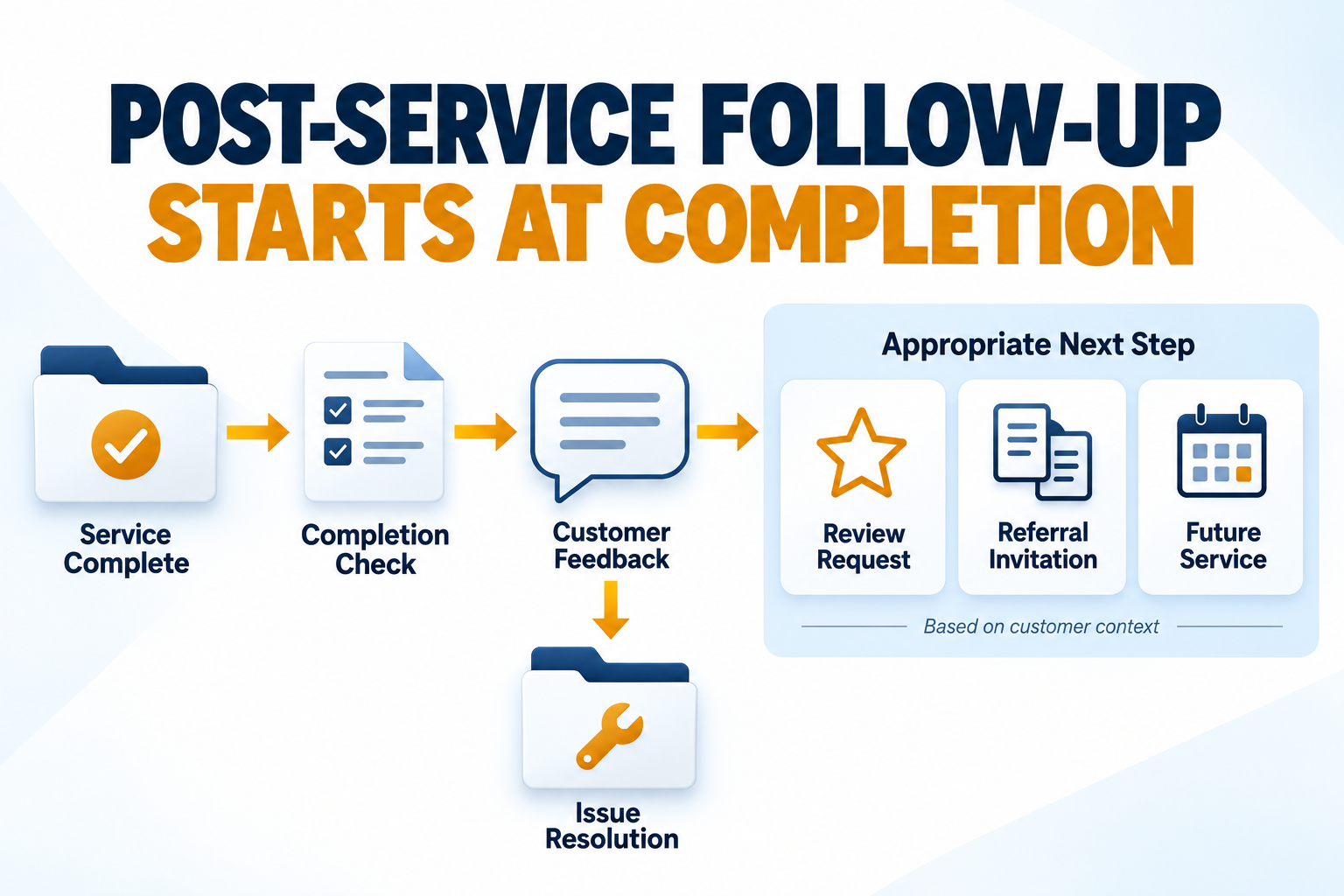
Post-service follow-up connects completed work to the next customer decision. It confirms what was delivered, creates a route for feedback, assigns unresolved issues, and determines whether a review request or future service reminder is appropriate.
The workflow should reflect the service and the customer’s situation. A simple appointment, a multi-stage project, and an ongoing service agreement do not need the same sequence. Start by defining what completion means and what information the customer needs afterward.
Confirm That the Service Is Actually Complete
Choose a reliable event to begin follow-up. A technician closing a task, a project manager approving delivery, or a customer accepting a handover may each be useful in a different business. An invoice being sent does not necessarily show that the work is complete.
Check the required completion details before enrollment. The record may need the service date, work performed, correct customer contact, responsible owner, and any outstanding actions. Decide whether payment questions, partial delivery, or a return visit require separate handling.
If the completion status changes, the workflow should respond. A reopened job or unresolved delivery item should pause messages that assume everything is finished. Keep a record of why follow-up started and what changed afterward.
Send a Clear Completion Confirmation
The first contact should help the customer understand the result of the service. Confirm what was completed and provide relevant documents, instructions, or support details. Use approved information from the service record.
Make the response path easy to find. The customer should know how to raise a concern, who will receive the reply, and what to do if the matter requires urgent attention. Set expectations that the business can meet.
Keep administrative and promotional purposes distinct. A completion message should not become a long sales pitch. Record any further contact preferences before adding the customer to a separate marketing or repeat-service sequence.
Ask for Feedback When the Customer Can Assess the Work
Choose timing based on when the customer can reasonably evaluate the service. Some work can be assessed immediately. Other services need a period of use before a useful response is possible. A universal reminder sent as soon as every job closes can miss that difference.
Keep the feedback request short and specific. Ask whether the service met the agreed need and whether anything remains unresolved. Provide an accessible way to reply without requiring the customer to complete an elaborate survey.
A lack of response is not confirmation that the customer is satisfied. Define a limited reminder rule, then close the feedback task or send it for review. Do not keep contacting someone indefinitely because a form remains incomplete.
Route Open Issues Before Sending More Messages
A reply reporting a problem needs an assigned action. Create a visible task or case, identify the owner, record the issue, and set an internal review date. The original delivery team may need to participate, but ownership should not depend on someone noticing an inbox message.
Pause routine promotional follow-up while an issue is being handled so the customer does not receive unrelated requests during a service conversation. The pause should apply consistently across the affected audience, rather than being used to select which customers are invited to review the business.
After the team records a resolution, check whether the customer needs a confirmation or another agreed action. Closing an internal ticket does not by itself establish that every customer concern has been addressed.
Treat Public Review Requests Separately From Feedback
Private feedback helps the business understand the service experience. A public review request invites the customer to share an honest account. Use separate records and messages for these purposes so the team can see what was requested and how the customer responded.
Use a consistent review-request rule for eligible customers. Do not make the invitation depend on a positive private survey score, direct only satisfied customers to a public review page, or ask for a particular rating. Leave the customer free to describe their experience.
Before configuring a public review workflow, check the destination platform’s current rules for solicitation, incentives, and reminders. Keep the invitation neutral and avoid rewards or promises tied to the review. Track whether an invitation was already sent to prevent duplicates.
Make Referrals an Appropriate Invitation
A referral request is another decision, not a mandatory step after every service. Consider whether the relationship supports it, whether the customer has already received other requests, and whether the timing makes sense.
Offer a simple way for a customer to share the business’s contact details or public information. Avoid asking them to submit another person’s details as if that automatically establishes permission to contact the person.
If someone makes an introduction, record its source and agree on the next step before enrolling the new contact in a sequence. Keep referral handling separate from the completed customer’s feedback record.
Plan Future Service Around a Documented Need
A relevant future reminder may be based on an agreed maintenance interval, a renewal date, or a customer request to revisit another service. Record the basis for that timing and confirm which communication is appropriate.
Do not assume that completing one service creates a need for every related offer. Use the actual service history and the customer’s stated interests. An internal review task may be sufficient when the next need is uncertain.
Some future opportunities require a longer conversation before the customer can decide. Our guide “What Should Happen to Lead That Are Interested but Not Ready to Buy?” explains how to manage that situation with clear ownership and relevant follow-up.
Define the Next Action for Each Response
Customer response or event | Workflow action | Owner responsibility |
Service concern reported | Open an issue and pause routine promotional messages | Review the concern and arrange the next action |
Question about completed work | Create an assigned support task | Reply using the verified service record |
Future service interest | Record the need and agreed timing | Confirm the appropriate sales or service path |
Request to stop further outreach | Update preferences and stop affected sequences | Check suppression across connected workflows |
No response by the sequence end | Close or review the follow-up task | Decide whether further contact is justified |
Use AI to Prepare Work for Review
AI can summarize service notes, draft a completion message, or flag replies that need attention. The business still needs approved source data and clear limits on what can be sent automatically.
Do not allow AI to invent work performed, state that an issue was resolved without evidence, promise a refund, or make a new service commitment. Route sensitive, urgent, and uncertain replies to an appropriate person.
Keep Stop Rules and Ownership Visible
Pause or end the relevant sequence when an issue opens, the customer replies, contact details fail, a preference changes, or another active conversation takes over. Define which messages are affected rather than applying a vague stop flag that no one understands.
Assign a primary owner and a backup for completion questions, feedback, and exceptions. A reply should update the CRM and create a task in the place the team actually works. Agree on an internal response expectation and make overdue work visible.
Test the Customer Experience Before Launch
Use controlled records to test a completed service, partial delivery, reopened job, complaint, duplicate contact, opt-out, and future-service request. Confirm that each event creates the intended task, message, or pause.
Review the combined message volume across workflows. A customer should not receive a completion confirmation, feedback reminder, review invitation, referral request, and new offer in a short burst merely because each automation passed its own test.
Measure Whether Follow Up Gets Completed
Track completion confirmations, replies, unresolved cases, assigned tasks, and overdue actions within a defined reporting period. Review duplicate invitations, delivery failures, and opt-outs as well as relevant future-service inquiries.
Keep the measures distinct. A feedback response is different from a public review. A referral invitation is different from an introduction. A future-service inquiry needs qualification before it becomes an opportunity in reporting.
Start With One Service and a Short Sequence
Choose one service with a clear completion event. Map the confirmation message, feedback timing, reply owner, issue pause, and sequence end. Add review, referral, or future-service steps only where the business can explain their purpose and manage the resulting responses.
This creates a workflow the team can maintain and gives the customer a clear way to continue the conversation after delivery.
Connect Service Completion to Customer Follow Through
The service record should show more than a closed job. It should show whether the customer received the right information, whether concerns need attention, and what follow-up has been agreed.
Creator Digital Media provides AI Growth Support to help businesses map post-service follow-up, connect replies to accountable owners, set campaign controls, and track whether customer actions receive the right response.