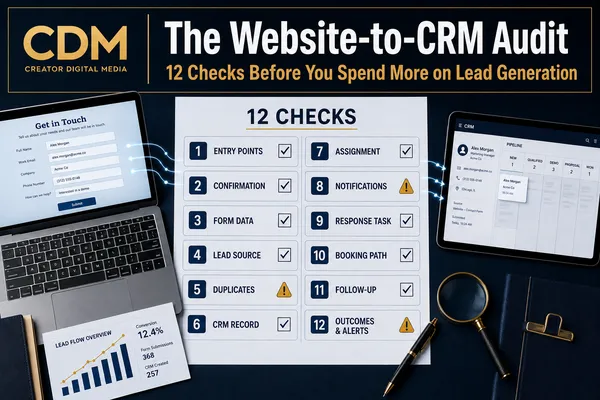
The Website-to-CRM Audit: 12 Checks Before You Spend More on Lead Generation
More traffic does not automatically create more sales opportunities. If your current website-to-CRM handoff is incomplete, additional advertising can increase the number of leads entering a process that already loses information, delays responses, or hides outcomes.
Before raising your lead-generation budget, test the full route an inquiry takes from the website to the CRM and the first sales conversation. The goal is not to confirm that the form sends an email. The goal is to prove that every qualified inquiry becomes a visible, owned, and measurable record.
The following 12 checks provide a structured way to find gaps before you pay to send more prospects into the system.
Why Audit the Handoff Before Increasing Traffic?
When lead volume is low, employees may compensate for a weak process by checking inboxes, copying information into the CRM, and remembering who needs a response. As volume increases, those informal fixes become harder to sustain.
A campaign can appear to underperform even when it generates suitable inquiries. If source data disappears, owners are not assigned, response tasks are overdue, or follow-up is inconsistent, the business cannot evaluate the campaign fairly.
The audit should follow a test lead through every stage and compare what should happen with what actually happens.
1. Verify Every Website Entry Point
List every place a visitor can become a lead: contact forms, consultation pages, landing pages, chat, appointment calendars, quote requests, and published phone numbers.
Submit a test through each entry point. A process that works on the main contact page may fail on an older landing page or embedded form.
2. Confirm the Visitor Receives a Clear Acknowledgment
Check the on-page confirmation and any email or text acknowledgment. The message should confirm receipt, set an accurate response expectation, and explain the next action.
Do not rely on a generic success message that leaves the visitor unsure whether anyone will follow up.
3. Review the Data Collected
Confirm that the form collects enough information to identify, route, and respond to the inquiry without creating unnecessary friction.
Required fields should match a real business need. Verify that names, email addresses, phone numbers, service interest, messages, and consent data arrive correctly.
4. Preserve the Lead Source and Campaign
The CRM record should retain the page, referral source, campaign, and UTM values associated with the submission.
If source information is missing, the business may credit the wrong channel or conclude that a campaign failed when the reporting path is the real problem.
5. Test Duplicate and Existing-Contact Handling
Submit a form using information that already exists in the CRM. The system should update the correct contact or follow a defined duplicate rule.
Disconnected duplicate records divide the conversation history and can trigger conflicting outreach.
6. Confirm the CRM Record Is Complete
Verify that a contact record is created or updated and that the original inquiry appears in the record. Check custom fields, tags, notes, attachments, and opportunity details.
The record should give the responder enough context to act without returning to the website inbox.
7. Verify Assignment and Backup Routing
Confirm that each inquiry receives one named owner according to the appropriate business rule.
Test what happens when the usual owner is unavailable. A backup user, team queue, or escalation rule should prevent unassigned leads.
8. Inspect Internal Notifications
Check who receives alerts, what information appears, and whether the notification links directly to the correct CRM record.
The alert should support action. It should not force the recipient to search several systems to understand what the prospect requested.
9. Check the Response Task and Service Standard
Every new inquiry should create a next action with a due time that reflects the request type and business hours.
Review overdue tasks and measure time to personal response. An automated acknowledgment does not satisfy the personal-response standard.
10. Test the Booking and No-Booking Paths
If the form offers a calendar, confirm that booked appointments update the CRM and notify the owner.
Also test what happens when the visitor submits the form but leaves without scheduling. The inquiry should remain visible and trigger follow-up.
11. Review Follow-Up Rules and Stop Conditions
Confirm that follow-up continues when there is no immediate reply and stops when the prospect responds, books, opts out, or reaches another defined outcome.
Check that communication permissions are respected and that team members can see every attempt.
12. Verify Outcomes, Reporting, and Failure Alerts
The process should record outcomes such as qualified, booked, won, lost, unresponsive, or not a fit. Reporting should connect the source to those outcomes.
Finally, confirm that failed integrations, incomplete records, bounced messages, and unassigned inquiries create visible alerts or exception queues.
How to Run the Audit
Use a small set of controlled test submissions and record timestamps for each stage. For every test lead, capture:
· Entry point and campaign source
· On-page and message confirmation
· CRM record creation or update
· Fields and source data preserved
· Assigned owner and backup route
· Internal notification received
· Response task and due time
· Booking status and no-booking path
· Follow-up attempts and stop condition
· Final outcome and reporting visibility
Run tests during business hours and after hours. Use both new and existing contact information. Include at least one failure scenario, such as an unavailable owner or incomplete field, to verify the exception path.
Decide What Must Be Fixed Before You Scale
Not every issue has the same business impact. Prioritize problems that cause leads to disappear, remain unassigned, receive delayed responses, or lose source attribution.
Next, correct gaps that create inconsistent follow-up or incomplete reporting. Cosmetic improvements can wait until the operating path is dependable.
After repairs, repeat the audit. Do not assume a changed workflow is working until a test lead completes the full path.
Spend More Only When the Lead Path Is Ready
A business is ready to increase lead-generation spending when it can see every inquiry, identify the owner, verify the response, track continued follow-up, and connect the original source to the final outcome.
Without that visibility, more traffic can increase activity without improving revenue. With it, the business can evaluate campaigns using actual pipeline and sales results instead of form counts alone.
Creator Digital Media helps businesses audit and improve the systems connecting websites, CRM records, assignments, notifications, follow-up, and reporting. If you are preparing to increase lead generation, validate the handoff first.



