What Parts of a Small-Business Sales Process Should Be Automated?
Sales automation should remove repeated administrative work without removing the judgment that helps a customer make a sound decision. The challenge is knowing where that boundary belongs.
Some businesses automate too little. Leads wait for a response, follow-up depends on memory, and CRM records remain incomplete. Others automate too much. Customers receive messages that ignore context, employees lose control of important conversations, and exceptions move through the same sequence as routine inquiries.
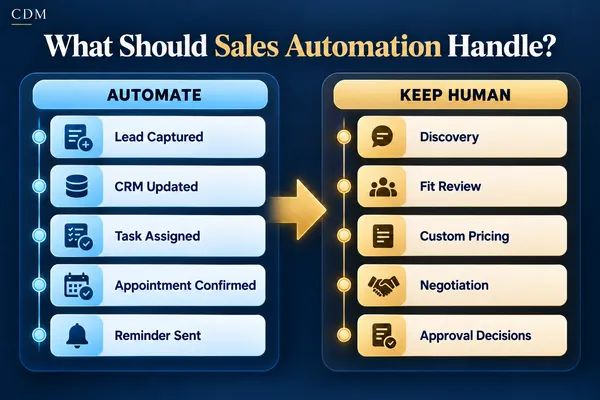
The strongest sales process combines both. Automation handles predictable steps, keeps work visible, and alerts the right person. People handle discovery, interpretation, negotiation, and decisions that affect trust.
Start With the Sales Process, Not the Tool
Before choosing what to automate, map the sales process from the first inquiry through the final outcome. Identify each stage, the person responsible, the information required, and the event that moves the opportunity forward.
A simple process may include new inquiry, initial response, qualification, consultation, proposal, decision, and closed outcome. The exact names matter less than the operating rules behind them. Each stage should answer what happened, what comes next, who owns it, and when action is due.
Do not automate a step that the business cannot explain clearly. If employees handle the same situation in conflicting ways, first agree on the process. Automation will otherwise repeat the inconsistency faster.
Automate Reliable Administrative Steps
A task is a good automation candidate when it is repeated often, follows clear rules, uses dependable information, and creates little risk if the standard path is followed.
· Lead capture and record creation. Create or update the CRM contact when a person submits a form, calls, sends a message, or books an appointment.
· Source and campaign tracking. Record where the inquiry came from so the business can compare leads with qualified opportunities and customers.
· Acknowledgment. Confirm that the inquiry was received and explain the expected next step without pretending a full conversation has occurred.
· Routing and ownership. Assign the opportunity by service, location, availability, customer type, or another approved rule.
· Task creation. Give the owner a clear action and due date instead of leaving the next step inside an inbox or conversation thread.
· Scheduling and confirmations. Offer approved appointment times, send confirmations, and provide rescheduling instructions.
· Routine reminders. Notify employees or customers about an agreed task, meeting, document, or follow-up date.
· Pipeline updates. Move records when a verified event occurs, such as a booking, proposal sent, acceptance, decline, or completed payment.
· Stalled-opportunity alerts. Notify the owner when an active opportunity has no next action or remains unchanged beyond the expected time.
· Reporting. Summarize lead volume, response times, stage movement, open tasks, and outcomes using consistent CRM data.
These steps support the sales team without asking automation to make decisions it cannot understand safely.
Keep People Responsible for Judgment
A person should remain responsible when the decision depends on context, experience, risk, relationship history, or a promise the business will need to keep.
· Discovery conversations. A person should understand the customer’s goals, constraints, priorities, and decision process when the sale is complex or consultative.
· Fit decisions. Automation can collect qualification information, but a person should review unclear, valuable, sensitive, or unusual opportunities.
· Custom scope and pricing. Nonstandard work, discounts, contract terms, and margin decisions require approved human authority.
·Objection handling. Concerns about trust, timing, cost, internal approval, or prior experience need a response that reflects the actual conversation.
· Negotiation. Automation should not make concessions, change terms, or create commitments outside approved limits.
· Sensitive customer situations. Complaints, accessibility needs, legal or financial questions, and emotionally charged conversations need a dependable handoff.
· Final accountability. A person should own the outcome, even when systems complete several steps around it.
Use AI to Support, Not Quietly Decide
AI can help summarize calls, draft follow-up messages, identify missing CRM information, suggest a response, and prepare a salesperson for the next conversation. Those uses can save time while leaving the decision with the employee.
The risk increases when an AI system can change pricing, promise a result, approve an exception, mark an opportunity as unqualified, or send a sensitive message without review. These actions need clear permissions and, in many businesses, a human approval step.
Define what the system may recommend, what it may complete, and what it must send to a person. The difference should be written into the workflow rather than left to individual interpretation.
Build Clear Handoffs Between Automation and People
Automation and human work fail when the handoff is vague. Every handoff should include enough context for the employee to act without reconstructing the entire history.
· The customer’s request and source
· Relevant messages, call summaries, and submitted information
· The current pipeline stage
· The action already completed
· The decision or exception requiring attention
· The assigned owner and due date
· The approved response options or escalation path
When the employee acts, the CRM should record the result and either continue the approved workflow or stop it. This prevents duplicate contact and keeps the system aligned with the conversation.
Set Stop Rules and Approval Limits
Every automated sequence needs conditions that pause or end it. A customer reply, booking, proposal acceptance, decline, opt-out, complaint, or request for a person should change what happens next.
Approval limits are equally important. Define who may approve discounts, revise scope, change contract language, extend deadlines, or make customer commitments. If a request falls outside those limits, the workflow should create an escalation rather than guess.
These rules protect the customer experience and prevent the system from continuing after the situation has changed.
Use Five Questions to Decide What to Automate
Is the step repeated often enough to justify automation?
Can the normal path be described with clear inputs, rules, and outcomes?
Is the information reliable enough for the system to act?
What could go wrong, and can the action be paused or corrected?
Does a person need judgment, authority, or relationship context at this point?
A repeated, rules-based, low-risk step is usually a strong candidate. A high-risk or context-heavy decision should remain human-led, even if AI helps prepare the information.
Test the Boundary Before Expanding
Start with one section of the sales process, such as new-lead intake, appointment scheduling, or proposal follow-up. Test routine cases, missing information, duplicate contacts, late replies, changed appointments, transfer failures, and opt-outs.
Review the workflow with the people who own the sales conversations. Confirm that the automation saves work, produces accurate records, and gives employees enough context at each handoff.
Measure response time, task completion, stage accuracy, customer replies, bookings, proposal outcomes, exceptions, and manual corrections. Expansion should follow reliable performance, not enthusiasm for the tool.
Choose a Sales Process People Can Trust
The goal is not to automate the largest possible share of sales work. It is to remove preventable delays and administrative gaps while keeping judgment where it adds value.
Use automation for capture, routing, reminders, verified status changes, and reporting. Keep people responsible for discovery, fit, exceptions, negotiation, and important customer commitments.
Creator Digital Media helps businesses map sales workflows, identify appropriate automation boundaries, and design the CRM tasks, approvals, handoffs, and reporting needed to support consistent execution.
Frequently Asked Questions
What sales task should a small business automate first?
Begin with a repeated administrative step that already causes delays or missed work, such as lead acknowledgment, task assignment, scheduling, or proposal follow-up. Choose a process with a clear owner and measurable outcome.
Can AI replace a salesperson?
AI can support research, summaries, drafting, routing, and routine communication. It should not replace the judgment, authority, and relationship work required in complex discovery, pricing, negotiation, or sensitive customer situations.
How much of the sales process should be automated?
Automate enough to make repeated work consistent and visible. Keep people involved wherever the outcome depends on context, approval authority, risk, or customer trust.
What information is needed before building sales automation?
Define the pipeline stages, triggers, required fields, owners, due dates, customer actions, exceptions, approval limits, stop rules, and outcomes the CRM must record.



