What Should a Small-Business Operations Dashboard Show?
A business owner should not need to search through a CRM, calendar, inbox, spreadsheet, and several team messages to understand what needs attention today. An operations dashboard should bring the most important work into one view and make the next decision easier.
That does not mean displaying every available metric. A crowded dashboard can create the appearance of visibility while leaving the owner unsure what to do. The strongest dashboard shows current demand, pending actions, exceptions, ownership, and movement over time.
For most small businesses, the purpose is straightforward: see what is happening, find what is stuck, and act before a lead or customer is affected.
Start With the Decisions the Dashboard Must Support
Before choosing charts or software, define the questions the dashboard must answer. A useful view should help an owner or manager decide where to focus, who needs support, and which workflow needs attention.
Common questions include:
· How many new leads arrived, and have they received a response?
· Which opportunities have no next action or are waiting too long?
· What appointments are scheduled, confirmed, cancelled, or missed?
· Which customer tasks or projects are due, overdue, blocked, or unassigned?
· Where are handoffs failing between sales, scheduling, onboarding, and service?
· Which exceptions need a person to make a decision today?
If a metric does not help answer an operating question, guide an action, or reveal a meaningful trend, it may not belong on the main dashboard.
Show New Demand and Lead Response
The first section should show how new demand is entering the business and whether the response process is working. Total lead volume alone is not enough. The dashboard should connect each inquiry to a source, status, owner, and next step.
Useful lead measures include new inquiries by source, median first-response time, leads awaiting a response, assigned versus unassigned leads, qualified opportunities, appointments booked, and leads closed or lost. A simple trend can show whether volume and conversion are moving in a useful direction.
The owner should be able to select a count and see the underlying records. If the dashboard shows five uncontacted leads, it should also show which five, how long they have waited, and who is responsible.
Make Follow-Up and Pipeline Movement Visible
Follow-up problems often remain hidden because the CRM contains records but does not make stalled work obvious. The dashboard should show active opportunities by stage and highlight records that lack a scheduled next action.
Include follow-ups due today, overdue tasks, proposals awaiting a response, opportunities with no activity beyond the expected time, and records missing an owner or required field. Track stage movement as well as stage totals. A large pipeline count can look healthy even when most opportunities have not moved for weeks.
Use age thresholds that reflect the actual sales process. A two-day delay may be serious for a new service inquiry but normal for a complex proposal. The dashboard rules should match how customers make decisions, not an arbitrary software default.
Track Appointments and Capacity
Appointment-based businesses need a view of both customer commitments and available capacity. The dashboard should show upcoming appointments, confirmation status, cancellations, rescheduling requests, no-shows, and open time that the business still has an opportunity to fill.
It should also expose operational problems. Repeated no-shows may point to reminder timing, unclear instructions, or a weak confirmation process. A high number of reschedules may signal a capacity or booking-rule issue. These patterns are more useful than a calendar count by itself.
If different locations, services, or employees have different capacity, allow the view to be filtered without turning the main screen into a dense scheduling report.
Show Open Work and Customer Commitments
Once a sale or booking occurs, the dashboard should continue to follow the work. Open customer commitments may include intake forms, documents, payments, approvals, onboarding steps, service tasks, delivery dates, or support requests.
Show work by status, due date, owner, and blocker. Separate items that are on track from those that need attention. The owner should be able to see whether a delay depends on the customer, an employee, a system failure, or an outside provider.
This prevents the dashboard from becoming a sales-only view. Business operations continue after conversion, and customer experience often depends on how well those later handoffs are managed.
Put Exceptions Ahead of Routine Activity
A dashboard becomes more useful when it emphasizes exceptions instead of treating every record as equally important. Routine work that is progressing correctly does not need the same attention as a missed response, overdue task, failed automation, or unassigned request.
A focused exception area may include:
· New leads without an acknowledgment or owner
· Follow-up tasks past their due date
· Opportunities stalled beyond the expected stage time
· Appointments needing confirmation or recovery
· Customer work blocked by missing information
· Failed messages, integrations, or workflow actions
· Records with missing consent, source, status, or outcome data
Each exception should lead to a record, an owner, and a next action. A red indicator without a resolution path only creates another item to investigate.
Use Ownership and Next Actions as Core Fields
Every active item should have an accountable owner and a visible next action. Without those fields, the dashboard can describe the problem but cannot support follow-through.
Ownership should identify the person responsible for moving the work forward, not everyone who has touched the record. The next action should describe what must happen and when it is due. If a record is waiting on the customer, that status should be explicit so the team does not mistake it for internal delay.
Managers can then review workload, overdue responsibilities, unassigned work, and handoff gaps without asking each employee for a separate status report.
Include Trends Without Overloading the Daily View
Daily operations require current status. Weekly and monthly reviews require trends. A well-designed dashboard can support both without placing every chart on the opening screen.
Track a short set of trends tied to decisions: lead volume by source, response time, qualification rate, booking rate, proposal outcomes, no-show rate, task completion, stage duration, workflow failures, and open-work aging. Compare consistent periods and keep definitions stable.
Avoid presenting an improvement or decline without enough context. A lower response time may be positive, but not if rushed replies reduce qualification quality. A higher booking rate may need to be considered alongside cancellations and no-shows.
Define Every Metric and Its Source
A dashboard is only trustworthy when the underlying fields are used consistently. Define what each metric means, which system supplies it, how often it updates, and who owns the data quality.
For example, decide whether a lead counts when a form is submitted, when a CRM contact is created, or when an employee confirms the inquiry is valid. Define when an opportunity becomes qualified and what events mark it won or lost. Without shared definitions, two reports can use the same label and produce different answers.
Review duplicate contacts, missing sources, inconsistent stage use, incomplete outcomes, and failed integrations. Reporting problems often begin as process or data-entry problems rather than dashboard problems.
Build Role-Based Views From One Operating Model
The owner, sales employee, scheduler, and service manager may need different views. That does not require separate definitions or disconnected reports.
Use one operating model and filter it by responsibility. An owner may need trends, capacity, and exceptions. An employee may need today’s assigned tasks and upcoming customer commitments. A manager may need workload, overdue actions, and records requiring escalation.
Role-based views reduce clutter while keeping the underlying information consistent across the business.
Review the Dashboard on a Set Cadence
A dashboard should support a repeatable management routine. Use the daily view to resolve urgent exceptions and the weekly view to examine workload, stage movement, capacity, and recurring failures. Use a monthly review to evaluate trends, definitions, and workflow changes.
During each review, record the action taken. If a metric repeatedly appears without leading to a decision, remove it or move it to a secondary report. If the team keeps asking a question the dashboard cannot answer, improve the data or add a focused measure.
The dashboard should change as the operation changes, but adjustments should be deliberate. Frequent redesign makes comparisons harder and weakens trust in the report.
Start With a Focused First Version
List the five to eight decisions the owner makes most often.
Identify the records, fields, owners, and dates needed for those decisions.
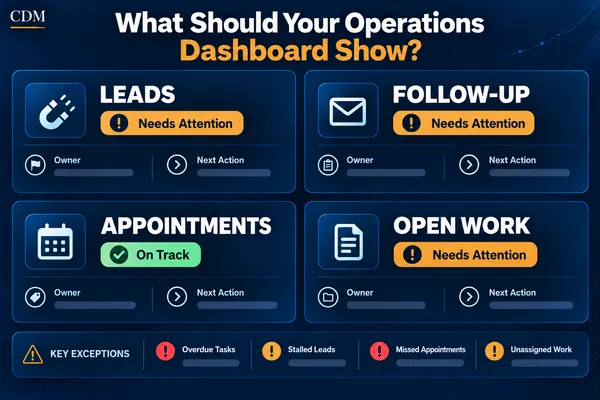
Create a main view for leads, follow-up, appointments, open work, and exceptions.
Verify that every count can be traced to the underlying records.
Test the view with the people responsible for acting on the information.
Review it weekly and add only the measures that support a clear decision.
This approach produces a useful management tool sooner and avoids spending time on charts that do not improve execution.
Build a Dashboard That Leads to Action
A small-business operations dashboard should show more than totals. It should reveal new demand, pending follow-up, appointment status, open customer work, ownership, and exceptions that require attention.
Keep the main view focused. Define the data, connect every alert to a record, and make the next action clear. Use trends for review, but design the daily dashboard around the work that must move now.
Creator Digital Media helps businesses define the operating questions that matter, connect CRM and workflow data, and build reporting views that support clearer decisions and consistent follow-through.
Frequently Asked Questions
What is the main purpose of an operations dashboard?
Its main purpose is to help owners and managers see current work, identify exceptions, assign responsibility, and decide what needs attention next.
How many metrics should a small-business dashboard include?
There is no fixed number. Start with the measures required for five to eight recurring operating decisions. Move secondary analysis to separate reports rather than crowding the main view.
Should an operations dashboard update in real time?
Use real-time or frequent updates for time-sensitive items such as new leads, failed workflows, and overdue actions. Daily or weekly refreshes may be enough for slower trends. The timing should match the decision.
What is the difference between a dashboard and a report?
A dashboard supports ongoing monitoring and action. A report usually provides deeper analysis for a specific period or question. A business may use both from the same underlying data.
Can a CRM serve as an operations dashboard?
Yes, if it contains reliable records, owners, stages, due dates, outcomes, and connected workflow data. Some businesses may still need a separate reporting layer for broader operational views.



