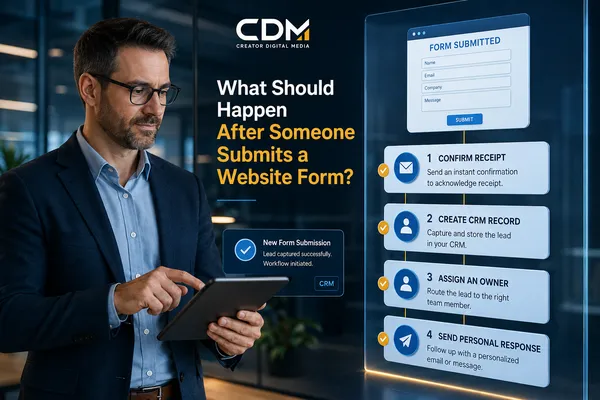
What Should Happen After Someone Submits a Website Form?
A visitor completes your website form and clicks Submit. From their perspective, the request is finished. From your business’s perspective, the most important part of the process has just started.
The next few minutes determine whether the inquiry becomes a real sales conversation or another contact that quietly disappears. A form notification sitting in an inbox is not a lead-management process. The information needs to be confirmed, recorded, assigned, and acted on.
A reliable handoff does not need dozens of automations. It needs a clear sequence in which every step has a purpose, an owner, and a visible outcome.
The Form Submission Is a Trigger, Not the Finish Line
Many businesses spend significant time improving landing pages, offers, and form fields, then give little attention to what happens after the submission. The form sends an email, and the rest depends on someone noticing it and deciding what to do.
That approach creates avoidable uncertainty. The prospect does not know when the business will respond. The team may not know who owns the inquiry. Managers may not be able to see whether the request entered the CRM or received follow-up.
The submission should trigger a defined operating process. At minimum, five things should happen.
1. Confirm That the Request Was Received
The visitor should receive an immediate confirmation on the website and, when appropriate, by email or text. The message should confirm receipt, set a realistic response expectation, and explain the next step.
A useful confirmation might state that a team member will review the request within one business day and provide a direct scheduling option. It should not promise an instant response if the business cannot deliver one.
Confirmation reduces uncertainty, but it should not be mistaken for the personal response. Its job is to reassure the prospect that the submission worked and establish what happens next.
2. Create or Update the CRM Record
The submitted information should create a new CRM contact or update an existing one. The record should preserve the original message, service interest, submission date, page or campaign source, and consent information.
Duplicate handling matters. If an existing customer or earlier prospect submits another form, the workflow should update the correct record instead of creating a disconnected copy. That gives the team the context needed to respond appropriately.
If the form and CRM are not connected, the business is forced to re-enter data manually. That creates delays, incomplete records, and inconsistent reporting.
3. Assign a Clear Owner
Every inquiry needs one person responsible for the next action. Assignment can be based on service, location, schedule, account relationship, or another business rule.
Sending the same notification to several people is not the same as assigning ownership. Group alerts can produce a familiar problem: everyone sees the message, but each person assumes someone else will respond.
The CRM record should show the assigned owner, the response deadline, and the next task. If the primary owner is unavailable, the process should have a fallback route.
4. Send the Right Internal Notification
The assigned person should receive a notification with enough context to act. It should include the prospect’s name, contact information, requested service, original message, source, and a direct link to the CRM record.
Avoid sending notifications that require the recipient to search several systems before understanding the request. The goal is to reduce the time between seeing the alert and taking the next action.
High-priority inquiries may need an immediate notification. Routine requests may be handled through a task queue. The urgency should reflect the type of request rather than treating every form the same way.
5. Begin a Timely Personal Response
The prospect should receive a personal response within the standard your business has established. That response should acknowledge the specific request, answer what can be answered, and move the person toward a clear next step.
The next step may be a consultation, a phone call, a request for additional information, or a referral to a more appropriate resource. The message should make that action easy.
AI may help summarize the inquiry or prepare a draft, but someone still needs responsibility for reviewing the context and ensuring the response fits the situation.
What Should Happen If the Prospect Does Not Respond?
The process should not end after the first personal message. A follow-up task or sequence should continue until the prospect responds, schedules, opts out, or reaches a defined inactive status.
The follow-up should be appropriate to the inquiry and communication permissions. A high-intent consultation request may warrant a prompt phone call and several attempts. A general question may need a lighter approach.
Each attempt should be recorded so the team can see what has happened and avoid duplicate or conflicting outreach.
The Process Also Needs an Exception Path
A workflow is not complete unless the business knows what happens when something fails. The CRM integration may disconnect. A required field may block the record. The assigned employee may be unavailable. An email may bounce.
Create a visible exception queue or alert for submissions that do not complete the expected steps. Someone should review that queue and resolve failures before leads remain unattended.
Test the process regularly by submitting forms from different pages, using both new and existing contact information, and testing outside business hours. Verify the visitor confirmation, CRM record, assignment, notification, and response task.
How to Measure Whether the Handoff Is Working
A business should be able to measure more than the number of forms submitted. Useful operating measures include:
· Percentage of submissions that create or update a CRM record
· Percentage of records assigned to an owner
· Time from submission to confirmation
· Time from submission to personal response
· Number of overdue response tasks
· Percentage of inquiries receiving continued follow-up
· Consultation or appointment booking rate
· Workflow failures and unassigned records
· Conversion from inquiry to qualified opportunity
These measures show whether the process is moving inquiries forward or simply collecting contact information.
A Simple Standard for Every Website Inquiry
After someone submits a website form, your business should be able to answer five questions immediately:
· Did the prospect receive confirmation?
· Was the information recorded correctly?
· Who owns the response?
· When is the next action due?
· Can the team see the complete history and outcome?
If any answer is unclear, the handoff is relying too heavily on inboxes, memory, or individual habits.
A reliable form workflow gives the prospect confidence and gives the business control. It creates a visible path from the moment an inquiry arrives to the first meaningful response and the follow-up that comes afterward.
Creator Digital Media helps businesses connect website forms, CRM records, assignments, notifications, and follow-up into one manageable process. If your website is generating inquiries but your team cannot clearly see what happens next, the first step is to map and test the complete handoff.



