When Has a Small Business Outgrown Spreadsheets for Lead Management?
A spreadsheet can be a sensible way to track leads when a business is small, the sales process is simple, and one person manages most follow-up. It is inexpensive, familiar, and easy to adjust.
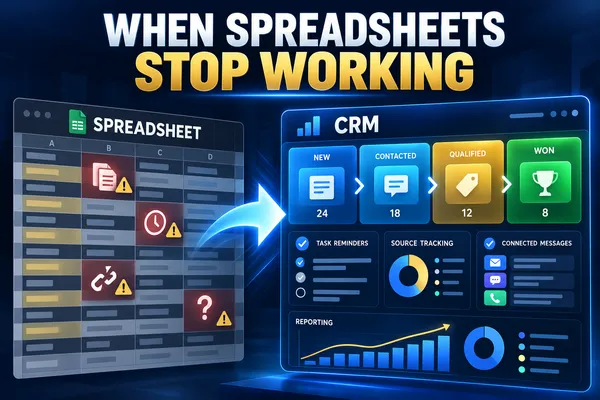
The problem begins when the spreadsheet is asked to do more than store rows. As lead volume grows, the business needs clear ownership, timely follow-up, conversation history, task reminders, handoffs, reporting, and dependable rules. A spreadsheet can record some of that information, but it does not manage the process well on its own.
The decision to move to a customer relationship management system should not be based on company size alone. It should be based on whether the current method still gives the team an accurate, usable view of every lead and next action.
When a Spreadsheet Is Still Enough
A spreadsheet may still work when the business receives a modest number of leads, one person owns the pipeline, follow-up is straightforward, and reporting needs are limited.
It can also be appropriate for a temporary list, a short campaign, or early process design. A business may use a sheet to identify the fields and stages it needs before configuring a CRM.
The key question is whether the spreadsheet remains reliable without constant checking, manual reconciliation, or separate reminder systems. If it does, there may be no reason to replace it yet.
A CRM Solves a Different Problem
A CRM is not simply a larger spreadsheet. It connects the contact record to conversations, pipeline stages, tasks, appointments, ownership, workflow rules, and reporting.
The system should help the business answer four operating questions: What happened? What needs to happen next? Who owns it? When is it due?
When a spreadsheet no longer answers those questions quickly and consistently, the business has started to outgrow it.
Seven Signs the Business Has Outgrown Spreadsheet Lead Tracking
1. More Than One Person Updates the Lead List
Spreadsheets become harder to trust when several people edit the same file, create personal copies, change columns, or use different definitions for lead status.
A CRM can give each user access to the same current record while preserving ownership, activity history, permissions, and standard stages. Collaboration becomes visible instead of depending on messages asking whether someone followed up.
2. Follow-Up Depends on Separate Reminders
A row can show a follow-up date, but it does not guarantee that the responsible person receives a task, reminder, or escalation when the date arrives.
If the business relies on calendars, inbox flags, sticky notes, or memory in addition to the spreadsheet, the lead process is already split across several systems. A CRM can connect the next action to the lead record and make overdue work visible.
3. Lead History Is Scattered Across Channels
A spreadsheet usually shows the latest status, not the complete conversation. Calls, emails, texts, forms, appointments, and notes may live somewhere else.
That separation creates weak handoffs. A team member may contact a lead without knowing what was promised, what question remains open, or why the person did not move forward. A CRM can bring the activity and current opportunity into one view.
4. Duplicate and Incomplete Records Are Common
Manual entry makes it easy to create duplicate contacts, inconsistent phone formats, missing sources, and blank status fields. These issues weaken follow-up and reporting.
A CRM does not eliminate data problems automatically, but it can enforce required fields, standardize choices, detect likely duplicates, and capture information directly from forms, calls, or booking pages.
5. The Owner Cannot See Pipeline Status Quickly
A spreadsheet may contain the data while still making the sales process difficult to understand. The owner must filter rows, ask for updates, or build manual summaries to see what is new, stalled, quoted, won, or lost.
A CRM pipeline makes stage, value, owner, next action, and time in stage easier to review. The goal is not a decorative dashboard. It is faster identification of work that needs attention.
6. Lead Sources Cannot Be Connected to Outcomes
A spreadsheet may record where a lead came from, but source data is often entered inconsistently or separated from appointments, proposals, sales, and revenue.
A CRM can preserve source information and connect it to later outcomes. That gives the business a better basis for deciding which channels produce qualified opportunities rather than counting inquiries alone.
7. The Business Needs Rules, Handoffs, or Automation
When different lead types require different owners, locations, services, response times, or qualification steps, manual spreadsheet routing becomes fragile.
A CRM can apply defined rules, create tasks, send acknowledgments, update stages, trigger reminders, and route exceptions. Those actions still require oversight, but they no longer depend on someone checking every row.
Do Not Choose a CRM Only Because the Spreadsheet Looks Messy
A disorganized spreadsheet may reveal a process problem rather than a software problem. Moving unclear stages, duplicate records, and inconsistent ownership into a CRM will reproduce the confusion in a more expensive system.
Before migration, define the lead journey, required fields, stage meanings, ownership rules, next actions, reporting needs, and archive policy. Clean the records that matter and decide what should not move.
The new system should reflect a clearer process. It should not become a storage location for every old row and note.
Compare the Cost of Staying With the Spreadsheet
A spreadsheet appears inexpensive because the file itself costs little. The hidden cost is the time spent checking, updating, reconciling, searching, reminding, correcting, and rebuilding reports.
Also consider missed follow-up, weak handoffs, duplicate customer contact, incomplete attribution, and delayed decisions. These costs may be difficult to see because they occur across many small moments.
A CRM introduces subscription, setup, migration, training, and maintenance costs. The decision is justified when the improved control and visibility address a real operating problem, not simply because a CRM has more features.
Use a Focused CRM Transition Plan
A small business does not need to migrate every process at once. Start with the lead path that matters most.
Document the current lead sources and entry points.
Define the minimum contact, source, status, owner, and next-action fields.
Simplify the pipeline around real customer decisions.
Clean active leads and remove obvious duplicates before import.
Assign ownership and permissions.
Configure forms, inboxes, calendars, and other required connections.
Test routing, reminders, stage changes, and stop conditions.
Train users on the few actions they must complete consistently.
Review adoption, data quality, overdue work, and reporting after launch.
Keep the first version narrow enough that the team can use it correctly. Add complexity only when the business can explain why it is needed.
What a Small-Business CRM Should Make Easier
· Capturing leads from the channels the business actually uses
· Seeing the current stage and next action
· Assigning one accountable owner
· Keeping conversations and notes with the contact record
· Creating follow-up tasks and reminders
· Managing handoffs without losing context
· Identifying stalled opportunities and overdue work
· Connecting lead sources to appointments, proposals, and sales
· Reviewing a focused pipeline without rebuilding reports
If a proposed CRM makes these tasks harder, the configuration is too complicated or the product is a poor fit.
Choose the System the Process Now Requires
A spreadsheet is not a failure. It may be the right tool for an early or simple lead process. The problem is continuing to rely on it after the business needs shared visibility, dependable follow-up, structured handoffs, and connected reporting.
Move to a CRM when the cost of fragmented work, unclear ownership, and missing information becomes greater than the effort required to implement and maintain a better system.
Creator Digital Media helps businesses assess their lead-management process, clean and structure CRM data, define pipeline stages, connect lead sources, and build follow-up workflows around the way the business operates.
Frequently Asked Questions
How many leads require a CRM?
There is no universal number. A business may need a CRM with a small lead volume if several people collaborate, follow-up is complex, or customer history is scattered. Another business may manage a larger but simple list in a spreadsheet. Process complexity matters more than a fixed count.
Can a spreadsheet and CRM be used together?
Yes, but each should have a defined purpose. The CRM should normally be the system of record for active leads. Spreadsheets may still support temporary analysis, imports, exports, or planning. Avoid maintaining two competing lead lists.
Should every old lead be moved into the CRM?
No. Review duplicates, incomplete records, consent status, age, source, and business value before migration. Move useful records with enough context to support future action and archive or delete data according to applicable retention requirements.
Will a CRM fix inconsistent follow-up?
Only when the business defines ownership, next actions, timing, and review rules. A CRM can create visibility and reminders, but it cannot compensate for an unclear process or a team that does not use the system.



