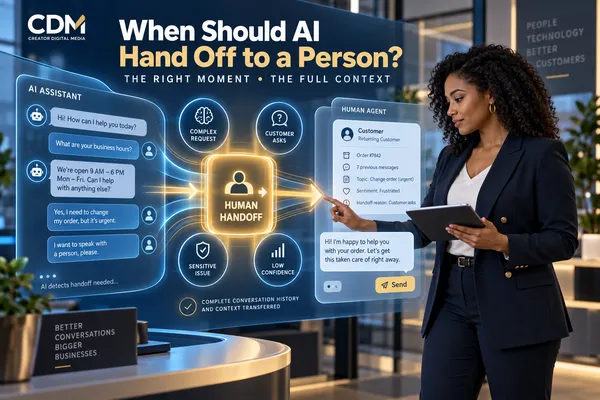
When Should AI Hand a Customer Conversation to a Person?
AI can answer routine questions, collect information, qualify requests, schedule appointments, and help customers outside business hours. The customer experience breaks down when the system continues after the conversation requires judgment, authority, empathy, or information the AI does not have.
A dependable AI workflow needs a defined way to transfer the conversation to a person. The handoff should happen for specific reasons, preserve the full context, assign the right employee, and tell the customer what will happen next.
The objective is not to maximize the number of conversations completed by AI. It is to resolve customer needs efficiently while protecting trust, safety, and service quality.
Start With the Work AI Is Allowed to Handle
Before defining escalation rules, establish the AI agent’s role. List the requests it may resolve, the information it may collect, the systems it may access, and the actions it may take. Also document what it cannot approve, change, disclose, or promise.
A narrow, well-defined scope makes handoff decisions more reliable. An appointment assistant may answer service questions, check availability, and schedule a qualified booking, while pricing exceptions, complaints, refunds, medical questions, legal issues, or unusual service requests move to an employee.
The approved scope should reflect the business, customer risk, available data, employee responsibilities, and any regulatory obligations. Do not rely on the AI to invent its own boundaries during a live conversation.
Transfer When the Customer Asks for a Person
A direct request for a person should be treated as a handoff signal. The system should not force the customer through repeated questions, insist that it can help, or hide the transfer option behind another menu.
The workflow may collect one piece of routing information when necessary, such as whether the request concerns billing, scheduling, sales, or support. That step should make the transfer faster, not create another barrier.
Tell the customer whether the employee is available now, when a response is expected, and which channel will be used. If the business is closed, create an assigned follow-up instead of leaving the request inside an unattended conversation.
Escalate Complex or Unfamiliar Requests
AI should transfer the conversation when the request falls outside its approved knowledge, workflow, or authority. Warning signs include conflicting requirements, several connected issues, missing account information, unusual exceptions, or a question that depends on business judgment.
A low-confidence answer should not be presented as a reliable decision. Define confidence thresholds and fallback behavior for the system. When the necessary information is unavailable or the response cannot be verified, the AI should say so clearly and route the request.
Repeated customer corrections are another signal. If the person has rephrased the same issue, rejected an answer, or stated that the system misunderstood, continuing the same automated loop usually increases frustration.
Move Sensitive or High-Risk Conversations to an Employee
Some topics require human review even when the AI understands the words. Complaints, disputes, cancellations with financial consequences, refund requests, safety concerns, threats, suspected fraud, accessibility needs, and personal hardship may require empathy, discretion, or authority beyond the automated role.
The business should classify high-risk topics in advance and decide whether the transfer must be immediate. Certain situations may require a supervisor, licensed professional, compliance contact, or emergency instruction rather than a general support queue.
Avoid asking customers to provide sensitive information that the AI workflow is not approved to collect or protect. The handoff design should control what data is captured, where it is stored, and who can access it.
Recognize Frustration and Conversation Failure
Frustration can appear through explicit statements, repeated negative responses, escalating language, or several unsuccessful attempts to complete the same task. Sentiment detection may help identify these patterns, but it should not be the only safeguard.
Use observable workflow signals as well. Examples include repeated fallback replies, several failed verification attempts, missing required data, tool errors, a stalled transaction, or a customer returning to the same step.
Set limits on how many times the AI may retry. A transfer after the second failed attempt is often more helpful than an apology followed by the same question for a third or fourth time.
Escalate Actions That Require Approval or Accountability
AI may gather information and prepare a recommendation without having authority to make the final decision. Discounts, contract changes, payment arrangements, service exceptions, account closures, refunds, credits, and commitments outside standard policy may require employee approval.
Define the value, risk, or policy thresholds that trigger review. The workflow should identify the requested action, collect supporting details, and assign the approval to a person with the correct authority.
Keep a record of what the AI suggested, what the employee approved or changed, and what was communicated to the customer. This creates operational accountability and helps the business improve the workflow.
Transfer the Full Conversation Context
A handoff is incomplete if the customer must explain everything again. Send the employee a concise transfer package that includes:
· Customer identity and verified contact details.
· Conversation transcript and a short summary of the request.
· Relevant account, order, appointment, or service information.
· Actions already completed by the AI and any results or errors.
· The reason for the transfer and the urgency level.
· Customer sentiment, stated preference, and promised response time.
· The next action expected from the assigned employee.
The summary should support the employee, but the original transcript should remain available. An automated summary can omit a detail or misinterpret the customer’s priority.
Route the Conversation to the Right Owner
Sending every handoff to one shared inbox can recreate the delays the AI was meant to reduce. Route by topic, location, service, customer status, language, urgency, account ownership, or employee authority.
Every transferred conversation needs an owner, status, response expectation, and escalation path. If the assigned employee does not respond, the workflow should reassign or notify a supervisor rather than allow the request to disappear.
When live transfer is available, confirm that the employee accepted the conversation before the AI exits. For delayed follow-up, create a task and tell the customer when to expect contact.
Tell the Customer What Is Happening
The handoff message should be direct. Explain that the request needs a team member, confirm that the conversation details will be shared, and provide the next step. Avoid vague statements such as “someone will contact you soon” when the business has a defined response time.
If the customer moves from chat to phone, email, or text, confirm the destination and contact information. Do not promise an immediate response unless the workflow can reliably deliver it.
The employee should enter the conversation with an informed opening that acknowledges the request. This reassures the customer that the transfer worked and reduces repetition.
Measure Whether Handoffs Resolve the Customer Need
Review the automated and human portions as one service process. Useful measures include:
· Handoff rate by conversation type and trigger.
· Time from transfer to employee acceptance and first response.
· Resolution rate after transfer.
· Repeat explanations, reopened conversations, and abandoned requests.
· Transfers sent to the wrong team or returned to automation.
· Customer satisfaction and employee feedback on context quality.
· AI responses corrected by employees and new escalation patterns.
A high handoff rate may indicate that the AI scope is too narrow or its information is incomplete. A very low rate may mean customers are being trapped in automation. Review both outcomes before changing the rules.
Design the Handoff Before Launching the AI Agent
Human handoff is not a backup feature to add after problems appear. It is part of the customer conversation from the beginning. Define the triggers, owners, service hours, routing logic, context package, response expectations, and exception paths before the AI handles live requests.
Begin with the highest-volume conversation types and the situations that carry the greatest customer or business risk. Test normal requests, unclear questions, direct requests for a person, system failures, emotional language, and actions that require approval.
Creator Digital Media helps businesses design AI customer communication workflows that connect automated assistance, CRM records, employee routing, and accountable follow-up without losing the customer’s context.
Frequently Asked Questions
When should a chatbot transfer a customer to a person?
Transfer when the customer asks, the request falls outside the approved scope, confidence is low, the topic is sensitive or high risk, the interaction repeatedly fails, or the requested action requires human approval.
What information should follow an AI to human handoff?
Send the customer identity, transcript, concise summary, relevant records, actions already taken, errors, handoff reason, urgency, customer preference, and the next action expected from the employee.
Should customers always be able to request a human?
Businesses should provide a clear human-help path. Routing details may be collected when needed, but automation should not repeatedly block or discourage a direct request for an employee.
How can a business prevent AI handoffs from being ignored?
Assign every transfer to an owner with a visible status and response target. Add reassignment or supervisor alerts when the request is not accepted within the expected time.



