Who Owns the Workflow After the Automation Goes Live?
An automation does not become self-managing when it goes live. Customer behavior changes, employees adjust the process, connected tools update, data quality shifts, and exceptions appear that were not obvious during testing.
Without a named owner, small problems remain unresolved until they affect customers or reporting. Alerts go unread, message wording becomes outdated, credentials expire, employees create workarounds, and no one decides whether the workflow still supports the business.
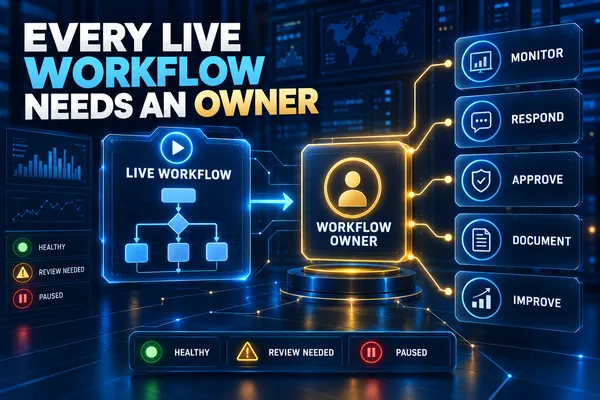
Every live automation needs one accountable owner with enough authority, access, time, and information to monitor the workflow and coordinate changes.
Ownership Is More Than Technical Access
The workflow owner is responsible for the operating result, not simply the software configuration. That person makes sure the process still produces the intended customer and business outcome.
The owner does not need to complete every technical change personally. A developer, platform administrator, vendor, or implementation partner may handle configuration. The owner remains accountable for identifying problems, deciding priorities, approving changes, and confirming that corrections work.
Assigning the person who built the automation may be appropriate, but it should not happen by default. The right owner understands the business process and can coordinate the people who use, support, and depend on it.
Name One Accountable Workflow Owner
Shared responsibility often becomes no responsibility. Several employees may support a workflow, but one role should be accountable for its health and business outcome.
Record the owner in the workflow documentation, operating dashboard, and escalation plan. If ownership sits with a role rather than a specific employee, document who currently fills that role and what happens during leave or turnover.
A backup owner should be able to pause the workflow, review current issues, access the documentation, and coordinate recovery. The backup is not a substitute for clear primary accountability.
Define the Owner Responsibilities
The exact duties depend on the workflow’s scope and risk, but ownership normally includes:
· Monitoring workflow status and business outcomes
· Reviewing failures, retries, exceptions, and manual corrections
· Confirming that customer messages and instructions remain accurate
· Maintaining owners, routing rules, calendars, permissions, and connected accounts
· Approving or coordinating changes to rules, templates, and actions
· Keeping workflow documentation and change history current
· Escalating customer, privacy, security, legal, financial, or operational concerns
· Reviewing performance on a set cadence
· Deciding when to improve, pause, replace, or retire the workflow
These duties should be written into the operating process. An owner cannot be held accountable for expectations that were never defined or supported.
Monitor Business Outcomes and System Health
A live workflow needs two kinds of monitoring. Business monitoring shows whether the process produces the expected outcome. System monitoring shows whether the automation completes its actions reliably.
For a lead-response workflow, business measures may include response time, qualified conversations, appointments, follow-up completion, opt-outs, and final outcomes. System measures may include successful runs, failures, retries, missing data, duplicate records, disconnected integrations, and manual corrections.
A technically successful run can still produce a poor result. A message may send while using the wrong appointment time, assigning the wrong owner, or continuing after the customer has replied. Review both the action and its effect.
Create a Clear Incident Response Path
When a workflow fails, the team should know who receives the alert, how quickly it should be reviewed, and who has authority to pause or change the process.
Classify incidents by customer impact and urgency. A reporting delay may wait for the scheduled review. Duplicate customer messages, incorrect pricing, unavailable appointments, exposed information, or repeated routing failures may require immediate action.
The response path should cover containment, customer follow-up, record correction, root-cause review, workflow repair, testing, and release. Record what happened so the same failure can be recognized more quickly if it returns.
Set Change Approval Rules
A live workflow should not change whenever someone has a new idea or encounters one unusual case. Define which adjustments the owner may approve and which require additional review.
Low-risk changes may include correcting a typo, replacing an expired link, or updating an internal notification. Higher-risk changes may affect customer eligibility, pricing, consent, data access, appointment availability, payments, contract language, or automated decisions.
Use a controlled change process: describe the problem, identify the affected records and actions, approve the change, test it, schedule the release, monitor the result, and document the final configuration.
Maintain Current Documentation
Documentation should reflect the workflow that is running now, not the version that launched months earlier. It should be clear enough for the owner and backup to understand the path, dependencies, and recovery process.
Maintain the workflow purpose, trigger, required fields, decision rules, customer messages, integrations, permissions, owners, stop conditions, alerts, handoffs, known exceptions, test cases, pause procedure, and change history.
Keep access information secure and separate from general process documentation. Record where credentials are managed and who may update them rather than copying sensitive values into an operating guide.
Review Access and Dependencies
Automations often depend on calendars, inboxes, phone numbers, forms, CRM fields, payment systems, webhooks, and third-party accounts. The workflow owner should know which dependencies can interrupt the process.
Review permissions and connected accounts when employees change roles, vendors change, or tools update. Remove access that is no longer required. Confirm that service accounts, renewals, and credentials have a responsible owner and backup plan.
A dependency inventory helps the team locate the cause of a failure instead of checking each system without a defined order.
Use a Regular Review Cadence
Not every workflow needs daily manual review, but every live automation needs a defined cadence. Match the schedule to customer impact, transaction volume, failure risk, and how quickly the business could detect a problem elsewhere.
A daily view may focus on failures, overdue handoffs, and customer-impacting exceptions. A weekly review may cover completion, retries, manual corrections, opt-outs, and unresolved incidents. A monthly review can examine trends, costs, rule changes, customer behavior, and improvement priorities.
Record the review date, findings, decisions, assigned actions, and follow-up date. A meeting without recorded ownership can leave the same problem open for another cycle.
Watch for Workflow Drift
Workflow drift occurs when the automation continues running while the business process around it changes. A service may be renamed, intake requirements may change, employees may stop using a field, or customers may begin entering through a new channel.
Signs of drift include increasing manual corrections, missing fields, growing exception volume, outdated messages, records stuck in one stage, duplicate customer contact, or employees bypassing the automation.
The owner should investigate why the workaround exists before forcing employees back into the original process. The workflow may need to change because the operation has changed.
Separate Ownership From Support
The owner, technical support provider, and process users have different responsibilities. Confusing them weakens accountability.
The workflow owner decides what outcome matters, which issues take priority, and whether a change is approved. Technical support diagnoses and implements configuration changes. Process users follow the approved workflow, report exceptions, and provide operational feedback.
Document these roles in a simple responsibility model so employees know where to send an issue and who makes the final decision.
Plan for Ownership Changes
Ownership should transfer deliberately when an employee changes roles or leaves. The handoff should include current documentation, open incidents, planned changes, access, review schedule, vendors, performance history, and known risks.
Confirm that the new owner can receive alerts, view reports, pause the workflow, approve changes within defined limits, and reach technical support. Test the backup and escalation contacts instead of assuming the account transfer completed correctly.
A workflow without a current owner should be reviewed for temporary suspension if it can affect customers or business commitments.
Know When to Pause or Retire the Workflow
Ownership includes deciding when automation should stop. A workflow may need to pause after repeated failures, a policy change, an unavailable dependency, inaccurate messages, unexpected customer impact, or loss of qualified support.
Retire a workflow when the business process no longer exists, the tool has been replaced, the volume no longer justifies maintenance, or the risk exceeds the value. Remove triggers, revoke unused access, archive documentation, preserve required records, and confirm that no scheduled actions remain.
Leaving unused automations active creates hidden dependencies and makes future troubleshooting harder.
Use a Simple Ownership Checklist
Name the accountable owner and backup.
Define the intended outcome and measures.
Route failures and exceptions to a monitored destination.
Set response times and escalation rules.
Document approval limits and the change process.
Maintain current workflow and dependency documentation.
Schedule daily, weekly, or monthly reviews based on risk.
Track incidents, changes, and assigned improvements.
Prepare ownership transfer, pause, recovery, and retirement procedures.
Keep the Workflow Accountable After Launch
A live automation needs active ownership because the system, the business, and customer behavior continue to change.
Assign one accountable owner, define support roles, monitor business and system results, maintain documentation, control changes, and review performance on a set cadence. Make sure a backup can respond when the primary owner is unavailable.
Creator Digital Media helps businesses review live workflows, clarify ownership, improve monitoring, document dependencies, and build an ongoing optimization process around customer-facing automation.



