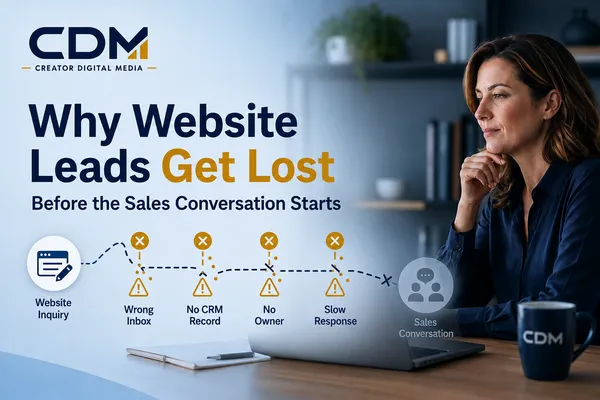
Why Website Leads Get Lost Before the Sales Conversation Starts
Your website may be generating inquiries without producing the number of sales conversations you expected.
When that happens, it is easy to assume the website needs more traffic, a stronger offer, or a redesigned form. Those may be valid improvements, but the problem often begins after a visitor clicks "Submit."
A website lead has to pass through several systems and people before it becomes a real conversation. The form must work. The right person must be notified. The contact information must reach the CRM. Someone must take ownership. A useful response must go out quickly. Follow-up must continue until there is a clear outcome.
A breakdown at any point can cause a promising inquiry to disappear.
The result is a frustrating gap between the leads your website appears to generate and the opportunities your team can actually see and manage.
The Hidden Gap Between an Inquiry and a Sales Conversation
Most websites treat form submission as the end of the lead-generation process. For the business, it is only the beginning.
Consider what should happen after someone requests a consultation:
1. The website confirms that the inquiry was received.
2. The lead’s information is recorded in the appropriate system.
3. The correct person is notified.
4. A team member is assigned responsibility.
5. The prospect receives a timely and relevant response.
6. The next action is scheduled.
7. Follow-up continues if the prospect does not respond.
8. The eventual outcome is recorded.
If these steps are not connected, the business is relying on memory, inbox checks, and individual habits. That may work when lead volume is low and one person manages every inquiry. It becomes unreliable as the business grows, adds services, or receives leads through multiple channels.
Where Website Leads Commonly Get Lost
Website lead loss is rarely caused by one dramatic failure. It is more often the result of small operational gaps that compound over time.
1. The Notification Goes to the Wrong Place
A form notification may be sent to an old email address, a shared inbox that is checked inconsistently, or one employee who happens to be unavailable.
The form can appear to work perfectly from the visitor’s perspective while the business never sees the inquiry. Notifications should reach the people responsible for responding, but there also needs to be a backup process when the primary recipient is unavailable.
2. The Lead Never Reaches the CRM
An inquiry that exists only in an email inbox is difficult to manage. Without a CRM record, the team may not be able to see where the lead came from, which service was requested, who owns the next action, whether anyone responded, or what eventually happened.
A reliable process creates or updates the contact record automatically and attaches the inquiry details to that record.
3. No One Clearly Owns the Response
Sending a notification to several people can create the impression that someone else will handle it. Everyone sees the lead, but no one is explicitly responsible for moving it forward.
Every inquiry should have a named owner, a response deadline, a defined next action, and a way to reassign the lead when necessary.
4. The First Response Is Too Slow or Too Generic
A prospect may submit forms to several businesses while researching a solution. If your response arrives much later, the prospect may already be speaking with someone else. If the message is generic and does not address the original request, it can feel like the business did not read the inquiry.
The first response should confirm that the message was received, acknowledge what the person asked about, and explain what happens next. Automation can provide an immediate acknowledgment, but it should support a timely human response rather than replace one.
5. The Form Creates Too Much or Too Little Friction
A form that asks for too much information may discourage completion. A form that asks for almost nothing may leave the team without enough context to respond effectively.
A consultation form should collect enough information to route the request and begin a useful conversation, without trying to conduct the entire discovery process online.
6. The Booking Step Becomes a Dead End
Redirecting every inquiry to a calendar can work when a prospect is ready to schedule. Not everyone is prepared to choose a meeting time immediately. If the person leaves without booking, the business still needs to retain the inquiry and follow up.
The calendar should be one available next step, not the only record that the lead existed.
7. Follow-Up Stops After One Attempt
A lead may not respond to the first email or phone call for many reasons. One unanswered message does not always mean the person is uninterested.
A defined sequence can help the team stay consistent. It should stop when the person responds, books, opts out, or is no longer a fit.
8. Automation Failures Go Unnoticed
Automation can improve reliability, but workflows can also fail. An integration may disconnect, a required field may block a CRM record, or a routing rule may assign the inquiry to an inactive user.
Businesses need a way to identify exceptions through error alerts, workflow logs, an unassigned-contact queue, or routine reconciliation between submissions and CRM records.
What a Reliable Website Lead Path Looks Like
A dependable lead path does not need to be complicated. It needs to be visible, assigned, and measurable. A typical process should:
· Capture the inquiry and its source.
· Confirm receipt and explain the next step.
· Create or update the CRM contact record.
· Attach the inquiry details to the record.
· Assign a responsible owner and follow-up task.
· Move the lead into the appropriate pipeline stage.
· Continue follow-up until there is a response or defined outcome.
· Record the final result.
This creates a continuous path from the website to the sales process. The business can see what happened, who is responsible, and which action should occur next.
What Businesses Should Measure
Website traffic and form-submission totals provide only part of the picture. To understand whether the lead path is working, track:
· Time from submission to acknowledgment
· Time from submission to personal response
· Number of unassigned inquiries
· Percentage of submissions that create CRM records
· Percentage of inquiries that receive follow-up
· Consultation or appointment booking rate
· Lead source and campaign
· Movement from inquiry to qualified opportunity
· Workflow errors or incomplete records
· Final outcomes, including won, lost, unresponsive, or not a fit
These measurements help distinguish a traffic problem from a follow-up problem. If the website generates qualified inquiries but few become conversations, increasing advertising may simply send more leads into the same broken process.
How to Audit Your Website-to-Sales Handoff
The most useful audit is a real-world test of the complete lead journey. Submit a test inquiry through each major entry point, including the contact form, consultation form, landing page, website chat, appointment calendar, and published phone number.
For each test, document:
· What the visitor sees after submitting
· Whether a confirmation message arrives
· Who receives the internal notification
· Whether a CRM record is created
· Which source and inquiry details are preserved
· Whether an owner and task are assigned
· How long the first response takes
· What happens if the lead does not reply
· Whether the outcome can be tracked
Test the exception paths too. Submit outside business hours. Use an existing contact. Skip an optional booking step. Select different services. Confirm what happens when the assigned person is unavailable. The purpose is to verify how the process works in practice, not how everyone assumes it works.
Where AI and Automation Can Help
AI and automation can improve specific parts of the lead path when they are connected to a clear process. They may help summarize detailed inquiries, classify leads, route contacts, draft an initial response for review, trigger follow-up tasks, identify records without action, and report on response times.
These tools are most useful when responsibilities and rules are already defined. They cannot compensate for an unclear offer, missing ownership, poor data, or a team that does not know what should happen next. The operating process still needs a responsible person, exception handling, and a clear definition of success.
The Goal Is a Visible, Owned Lead Path
A website lead should never depend on someone remembering to check an inbox. From the moment an inquiry arrives, the business should be able to answer four questions:
· Where did the lead come from?
· Who owns the next action?
· What has already happened?
· What should happen next?
When those answers are visible, follow-up becomes more consistent and management has a clearer view of the opportunities entering the business.
Before investing in more traffic, audit the path your existing leads already take. The most valuable improvement may not be another campaign. It may be fixing the handoff between the website and the first real sales conversation.
Creator Digital Media helps businesses evaluate and improve the systems connecting website inquiries, CRM records, follow-up workflows, and sales activity. If your website is generating inquiries but you cannot clearly see what happens next, the first step is to map the complete lead path and identify where opportunities are being lost.



